
SocialPilot Alternatives: The Best Social Media Scheduling Tools for Agencies & Creators in 2026
SocialPilot earned its place for a reason. It offered an affordable scheduling tool without the enterprise-level pricing. But as you add more clients and more accounts, pricing doesn’t always stay as lightweigh, and the math stops mathing after a while.
SocialPilot earned its place for a reason. It solved a very real problem for agencies, freelancers, and growing businesses that needed affordable scheduling without the enterprise-level pricing of tools like Hootsuite or Sprout Social.
For years, it became one of the easiest recommendations for teams that wanted reliable publishing, bulk scheduling, client approvals, and the ability to manage multiple social accounts without destroying their budget. And honestly, for straightforward scheduling workflows, it still works well.
But social media workflows changed fast.
A common pattern you’ll see in Reddit discussions and creator communities is that the frustration usually isn’t about scheduling itself anymore. It’s about the repetitive workflow around scheduling. Copy-pasting the same content across platforms. Managing dozens of disconnected content streams across blogs, podcasts, e-commerce stores, newsletters, and social channels.
At some point, scheduling stops being the hard part. Managing the workflow becomes the hard part.
That’s where newer tools started differentiating themselves.
What SocialPilot Still Gets Right
Before comparing alternatives, it’s important to say that SocialPilot remains popular since it focuses on practical publishing features instead of trying to become an overly complex platform. For some agencies and freelancers, especially, that simplicity is part of the appeal.
| Strength | Why it matters |
|---|---|
| Affordable pricing | More accessible than enterprise tools like Hootsuite, especially for agencies and growing teams. |
| Strong bulk scheduling | CSV imports, batch publishing, and fast post creation make it useful for planning content at scale. |
| Client approvals | Simple approval workflows help teams review and approve content without adding extra complexity. |
| Multi-account management | Makes it easy to manage multiple brands, clients, and social accounts from one place. |
Affordable Pricing
One of SocialPilot’s biggest advantages has always been pricing.
Compared to platforms Hootsuite, here’re some Hootsuite alternatives since we are on the subject, SocialPilot feels significantly more accessible.
For many agencies, that balance between affordability and multi-account management is still one of SocialPilot’s strongest selling points.
Bulk Scheduling Is Still Strong
CSV imports, batch publishing, and fast post creation workflows make it efficient for teams scheduling large volumes of content. If your workflow revolves around preparing content in batches and publishing it across many accounts quickly, SocialPilot still does that reliably.
Client Approval Features Still Work Well
The approval system is relatively clean, easy to understand, and more agency-friendly than many cheaper scheduling tools.
It may not have the deepest collaborative workflows in the market, but for straightforward approval processes, it gets the job done.
Multi-Account Management Is Easy
Managing multiple brands, clients, and social accounts inside SocialPilot is also fairly straightforward.
A lot of social media tools become cluttered or overwhelming as accounts grow. SocialPilot generally keeps the experience manageable, especially for small-to-mid-sized agencies juggling many client profiles at once.
Why Teams Start Looking for SocialPilot Alternatives
At a certain point, most teams don’t outgrow SocialPilot because it breaks. They outgrow it because their workflow stops matching what the tool was designed for.
This shift builds slowly as content volume increases, platforms multiply, and publishing becomes more automated than manual.
Manual Scheduling Gets Old
What used to feel simple, upload, schedule, repeat, starts turning into repetitive operational work.
And that’s usually where frustration starts creeping in.
SocialPilot still handles scheduling well, but it doesn’t fundamentally remove the repetition.
Automation Feels Limited
Compared to newer workflow-first tools like Nuelink, SocialPilot feels more like a structured scheduler than an automation engine.
It has automation features, but they tend to stay on the surface level rather than building a full content ecosystem.
✍️ Write once, post everywhere. Nuelink turns every new blog post, product, or episode into scheduled content across 12+ platforms.
Start free for 7 daysPricing Feels Different at Scale
On paper, SocialPilot is affordable. And for small teams, it absolutely is.
But as you add more clients and more accounts, pricing doesn’t always stay as lightweight as it initially appears. So while it feels budget-friendly early on, the math stops mathing after a while.
And that’s usually the point where teams start actively exploring alternatives.
The Best SocialPilot Alternatives in 2026
Once teams start feeling those workflow gaps, the next question is usually the same: what should we use instead?
The honest answer is that there isn’t a single “best” alternative. Some teams prioritize automation. Others care about collaboration. Some want simplicity. Others want deep analytics or engagement systems.
If your focus is reducing manual work and building scalable content systems, tools like Nuelink tend to stand out. If your priority is approvals and client workflows, collaboration-first platforms take the lead. And if you just want something clean and easy, simpler schedulers still win.
Below is a breakdown of the strongest SocialPilot alternatives in 2026, and what each one is actually best at in practice.
Nuelink
Best for: Automation, evergreen content, and cross-posting
Nuelink is a social media management platform designed for businesses and creators who want to automate their content publishing. Rather than manually scheduling every post, it helps you create automated workflows that continuously publish and recycle content across multiple social networks.
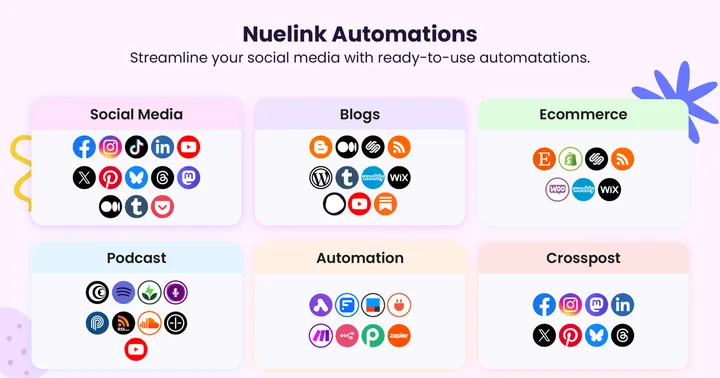
The platform can automatically pull content from blogs, online stores, podcasts, newsletters, RSS feeds, and other sources, making it particularly useful for content-heavy businesses that want to maintain a consistent social media presence with minimal manual work.
Ideal For
- Content creators.
- Bloggers.
- Podcasters.
- Ecommerce brands.
- Marketing agencies.
- Small and medium-sized businesses.
- Teams managing multiple social media accounts.
Key Features
Content Automation
- Automatically publish content from RSS feeds, blogs, newsletters, and podcasts.
- Create automated workflows for recurring content.
- Reduce manual scheduling and posting tasks.
Cross-Posting
- Publish content across multiple social media platforms from a single dashboard.
- Customize posts for different networks.
- Repurpose existing content automatically.
Evergreen Content Management
- Recycle content automatically.
- Organize posts into reusable content collections.
- Keep social channels active without constantly creating new content.
Additional Tools
- NueBio link-in-bio tool and landing page.
- Built-in URL shortener.
- Basic social media analytics and performance tracking.
Pricing
- Starts at $24/month
- 7-day free trial available
Rating
G2 Rating: 4.8/5
Why people choose Nuelink: Its main strength is automation. While many social media tools focus primarily on scheduling, Nuelink helps businesses build automated content systems that continuously publish, recycle, and distribute content with minimal ongoing effort.
Want a direct head to head? See exactly how Nuelink stacks up against SocialPilot on automation depth, pricing, and real user feedback in our detailed comparison. Read Nuelink vs SocialPilot!
Planable
Best for: Collaboration, content approval workflows, and client review processes
Planable is a social media collaboration platform designed to make content review and approval much easier for teams and agencies. Instead of focusing mainly on scheduling or automation, it centers the entire workflow around collaboration.
It is especially useful for agencies and marketing teams where content must pass through clients, managers, or legal reviewers before going live.
Ideal For
- Marketing agencies.
- Client-facing social media teams.
- Large marketing departments.
- Brands with strict approval processes.
Key Features
Visual Content Planning
- Preview posts exactly as they will appear when published.
- Organize content in a clean, visual calendar.
- Plan campaigns with full context.
Collaboration Tools
- Comment directly on posts for feedback.
- Real-time collaboration between team members.
- Centralized discussion around each piece of content.
Approval Workflows
- Multi-step approval processes.
- Client approval flows for agencies.
- Internal review stages for teams.
Pricing
- Starts at $33/month
- Free plan available
Rating
- Trustpilot Rating: 4.6/5
Why people choose Planable: It stands out for simplifying collaboration. Teams that struggle with messy approval processes, scattered feedback, or client revisions use Planable to bring structure and clarity to content review before publishing.
Later
Best for: Visual brands, Instagram planning, and content organization
Later is a social media management platform built around visual content planning. It is particularly popular among creators, lifestyle brands, ecommerce businesses, and marketers who rely heavily on Instagram and other visual-first social networks.
Unlike automation-focused tools, Later emphasizes content organization, feed aesthetics, and campaign planning.
Ideal For
- Influencers and content creators.
- Fashion brands and beauty and skincare companies.
- Travel creators.
- Visual-first marketing teams.
Key Features
Visual Content Planning
- Drag-and-drop content calendar.
- Visual social media scheduling.
- Campaign planning and organization.
- Content workflow management.
Instagram Management
- Instagram feed preview and planning.
- Curated grid layout management.
- Instagram-focused publishing tools.
Media Organization
- Centralized media library.
- Easy access to photos and videos.
Scheduling & Optimization
- Schedule content across multiple social platforms.
- Best time to post recommendations.
Pricing
- Starts at $18.75/month (billed annually)
- 14-day free trial available
Rating
G2 Rating: 4.5/5
Why people choose Later: Its biggest advantage is visual planning. Later makes it easy to organize content, maintain a cohesive feed, and plan social campaigns through a highly visual workflow.
Agorapulse
Best for: Social inbox management, engagement, and community handling
Agorapulse is a social media management platform built for teams that prioritize engagement and community interaction over pure content scheduling. Its main strength is a unified social inbox that centralizes all comments, messages, mentions, and interactions across platforms into one place.
Instead of treating social media as only a publishing channel, Agorapulse focuses on helping teams manage conversations at scale. It is especially useful for brands with active audiences or customer-facing social channels where responsiveness and engagement matter as much as posting content.
Ideal For
- Brands with active online communities.
- Customer support teams using social media.
- Marketing agencies managing multiple accounts.
- Businesses with high message or comment volume.
Key Features
Unified Social Inbox
- Centralized inbox for comments, messages, and mentions.
- Real-time engagement tracking.
Team Collaboration
- Assign conversations to team members.
- Internal workflows for handling responses.
Social Listening & Monitoring
- Track brand mentions across platforms.
- Monitor keywords and conversations.
Publishing Tools
- Schedule and publish posts across multiple channels.
- Manage content alongside engagement workflows.
Pricing
- Starts at $79/month
- 30-day free trial available
Rating
G2 Rating: 4.5/5
Why people choose Agorapulse: Teams that need structure around engagement, replies, and customer interaction tend to prefer it over scheduling-focused tools.
Buffer
Best for: Simple, lightweight social media scheduling
Buffer is a social media management tool designed for straightforward publishing and scheduling. It’s especially popular among solo creators, freelancers, small businesses, and small teams that want an easy way to maintain a consistent posting schedule without dealing with complex workflows.
The platform focuses on simplicity and ease of use. Instead of offering advanced automation or heavy analytics, Buffer keeps things minimal, making it fast to set up and easy to manage day-to-day content publishing.
Ideal For
- Solo creators.
- Freelancers.
- Startups.
- Small businesses.
Key Features
Simple Scheduling
- Easy-to-use post scheduling interface.
- Queue-based publishing system.
Content Publishing
- Schedule posts in advance.
- Maintain consistent posting.
- Manage basic content workflows.
Ease of Use
- Clean, minimal interface.
- Beginner-friendly.
Basic Analytics
- Lightweight performance tracking.
- Simple insights into post engagement.
Pricing
- Starts at $5/month per channel (billed yearly)
- 14-day free trial available
Rating
G2 Rating: 4.3/5
Why people choose Buffer: It’s one of the simplest tools in the social media management space. Users who don’t need automation, approvals, or complex analytics often prefer Buffer because it gets the job done without unnecessary complexity.
Hootsuite
Best for: Enterprise social media management, large teams, and advanced operations
Hootsuite is one of the most established social media management platforms, widely used by large organizations and enterprise marketing teams. It is designed for managing complex social media operations at scale, combining publishing, analytics, social listening, and team workflows in a single platform.
Unlike lightweight scheduling tools, Hootsuite focuses on structure and data-driven decision-making. It is particularly useful for organizations that need strict approval processes, detailed reporting, and coordinated team management across multiple channels.
Ideal For
- Enterprise marketing teams.
- Agencies managing multiple high-volume accounts.
- Companies needing social listening and monitoring.
- Teams requiring structured approval workflows.
Key Features
Advanced Analytics & Reporting
- Detailed campaign and performance reports.
- Multi-account analytics dashboards.
Social Listening & Monitoring
- Track brand mentions and keywords.
- Monitor conversations across platforms.
Unified Social Inbox
- Manage messages, comments, and mentions in one place.
- Streamlined engagement workflows.
Team Collaboration & Governance
- Role-based permissions and access controls.
- Content approval workflows.
Enterprise Integrations
- CRM and customer support system integrations.
- Security and compliance features for large organizations.
- Scalable infrastructure for high-volume usage.
Pricing
- Starts at $99/user/month
- 30-day free trial available
Rating
G2 Rating: 4.3/5
Why people choose Hootsuite: It’s built for scale and structure. Organizations that need full control over publishing, approvals, analytics, and social listening choose Hootsuite when simpler tools are no longer enough to manage their operations effectively.
Social Pilot still holds up well as a reliable, affordable scheduling tool for agencies and teams that want structured publishing without unnecessary complexity. It does what it was originally designed to do, and for many workflows, that’s still enough.
But teams are no longer just planning posts. They’re building content systems.
That shift is where the gap starts to show. This is where newer tools start to stand out.