
Nuelink vs SocialPilot: The Better Choice for Growing Agencies
SocialPilot has built its entire identity around agencies.
White-label reports. Client approval workflows. Multi-account management. A price point that makes Hootsuite and Sprout Social look unreasonable. For agencies that manually create and schedule content on behalf of clients, SocialPilot is a solid, well-priced tool.
But there is a different kind of agency in 2026. One that serves clients with active content operations. E-commerce brands. Podcasters. Bloggers. Businesses that publish constantly and need a system that makes all of that content work on social automatically, without someone manually scheduling every post.
That is where SocialPilot falls short. And that is where Nuelink steps in.
We will look at the full feature comparison, the pricing, and most importantly, which tool is actually better for agencies and why.
Let's get into it.
Nuelink vs SocialPilot: First Impression
| Feature | Nuelink | SocialPilot |
|---|---|---|
| Starting price | $18/month | $30/month |
| Free plan | ✅ 7-day free trial | ✅ 14-day free trial |
| Money-back guarantee | ✅ 30 days | ❌ No |
| Pricing model | Flat rate per brand tier | Flat rate per plan |
| Content recycling | ✅ Built-in | ✅ Yes |
| RSS auto-posting | ✅ Yes | ✅ Basic |
| Auto-post products/podcasts | ✅ Yes | ❌ No |
| Automated crossposting | ✅ Yes | ✅ Basic |
| Bulk scheduling via CSV | ✅ Yes | ✅ Yes (up to 500 posts) |
| Analytics | ✅ Built-in, all plans | ✅ Standard plan+ |
| Social inbox | ✅ Built-in | ✅ Standard plan+ |
| Client approval workflows | ✅ Coming soon | ✅ Premium plan+ |
| White-label reporting | ❌ No | ✅ Premium plan+ |
| Link in Bio | ✅ All plans (Nue Bio) | ❌ No |
| Link shortener | ✅ Built-in, all plans | ❌ No |
| Ecommerce integrations | ✅ Shopify, WooCommerce, Etsy, Wix, Squarespace, Weebly | ❌ No |
| Podcast integrations | ✅ Buzzsprout, Captivate, Castos | ❌ No |
| Timezone control per brand | ✅ Yes | ❌ No |
| Shortcodes | ✅ Yes | ❌ No |
| Collections system | ✅ Yes | ❌ No |
| Supported platforms | 12 | 9 |
What Agencies Actually Need From a Social Media Tool
Before comparing features, it is worth asking a more important question: what does a modern agency actually need from a social media tool?
Across the board, most agencies need some combination of the following:
Operational efficiency: The ability to manage multiple clients without proportionally multiplying the time spent per client.
Client isolation: Each client's content, channels, and data should be completely separated.
Scalable content publishing: As clients grow their content operations, the tool should keep up. A client who starts a podcast, launches a store, or begins publishing a weekly newsletter should not require more manual work from your team.
Predictable pricing: Agency economics only work when costs are fixed. A tool that charges per profile or per user makes it impossible to plan margins.
Proof of work: Clients want to see results. Analytics, reports, and performance data are not optional.
Adaptability: An agency tool needs to keep pace with the industry, support new social channels quickly, ship new features regularly, and not leave you managing client accounts on a platform that stopped evolving two years ago.
Team management: As an agency, you will need to coordinate writers, strategists, account managers, and clients in a single workflow. That means role-based permissions, clear task ownership, activity tracking, and the ability to collaborate professionally without everything collapsing.
Both SocialPilot and Nuelink address some of these.
What SocialPilot Offers Agencies
SocialPilot's agency features are real and well-executed for a specific type of workflow.
1. 🏷️ White-Label Reporting
Available on the Premium plan and above. Agencies can generate branded PDF reports with their own logo and colors.
2. 👥 Client Approval Workflows
Also available from the Premium plan. Clients can review and approve content before it goes live without needing their own SocialPilot account.
3. 📅 Bulk Scheduling
SocialPilot allows uploading up to 500 posts via CSV, one of the higher limits in its price range.
4. 📊 Analytics and Reporting
Cross-channel performance reports available from the Standard plan. Clean, readable, and sufficient for most client reporting needs.
What Nuelink Offers Agencies
Most people think of Nuelink as a tool for creators and small businesses. But look closer at how it is built, and it is clear the product was designed with agencies in mind too.
One Brand Equals One Client
Nuelink's brand system is built around the same logic agencies use.
Each brand is a completely separate workspace with its own social channels, collections, automations, queue, and team members.
Adding a new client means adding a new brand. Everything stays clean and separated.
Timezone Control per Client (Brand)
When you manage clients across different countries or regions, posting times matter. Nuelink lets you set a timezone per client (brand), so a client in New York posts at peak New York time while a client in Dubai posts at peak Dubai time.
All managed from the same dashboard without manual adjustments.
Powerful Collection System
Each brand gets its own set of collections. That means each client can have a dedicated collection for promotional content, one for blog posts, one for evergreen content, all running on their own independent schedules.
A Link in Bio for Every Client
The Agency plan includes 10 Link in Bio pages via Nuebio. One per client. Each one is a fully customizable mini-website with its own domain, analytics, Facebook Pixel, and mini shopfront. Most agencies charge separately for this kind of deliverable. With Nuelink, it is included.
Team Collaboration and Role Management
Each Nuelink plan includes multiple team members with role-based access.
You can give a client view-only access to their own brand without exposing other clients' workspaces. A copywriter can draft posts without being able to publish. A manager can approve without touching the schedule. Clean permission structure without the enterprise price tag.
Affordable Pricing
This is where the argument becomes very hard to ignore.
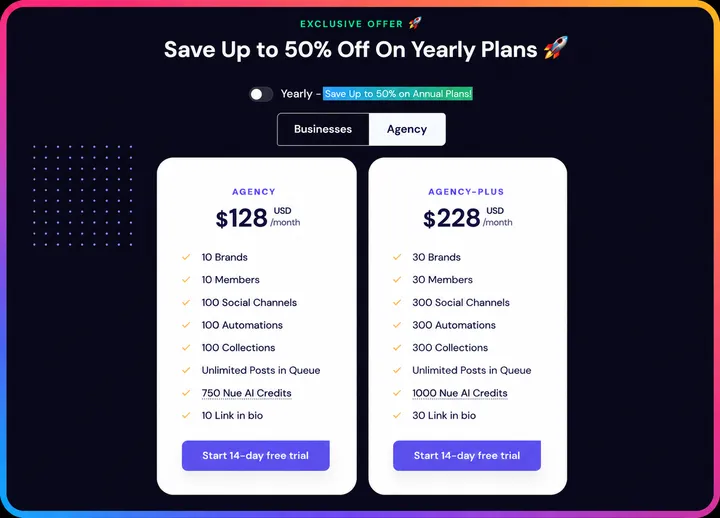
| Plan | Price | Brands (Clients) | Channels | Members |
|---|---|---|---|---|
| Agency | $128/mo | 10 | 100 | 10 |
| Agency Plus | $228/mo | 30 | 300 | 30 |
At $128/month, you are managing up to 10 client brands with 100 social channels and 10 team members. That works out to roughly $12.80 per client per month.
SocialPilot's Premium plan at $100/month covers 20 accounts and 6 users. No automations.
Automations that Reduce per-client Workload
For agencies serving clients with active content operations, this is the biggest differentiator. Connect a client's Shopify store, podcast, or blog once, and Nuelink handles the social publishing automatically from that point forward.
Features Nuelink Has That SocialPilot Simply Doesn't
Beyond the agency-specific features covered above, Nuelink also includes a set of capabilities that SocialPilot does not offer at all.
Automated Crossposting
With Nuelink, you write your post once and it goes everywhere automatically. No tab switching. No copy-pasting. No repeating the same caption across five platforms every single day.
For someone publishing daily across multiple platforms, that is easily an hour back in your day, every day.

Automations That Actually Save Time
This is where Nuelink leaves SocialPilot behind entirely.
Connect your content sources and Nuelink publishes them to social media automatically the moment they go live:
- 📝 Blog articles via RSS, WordPress, or Medium
- 🎙️ Podcast episodes via Buzzsprout, Captivate, Castos, or any RSS feed
- 🛍️ Products via Shopify, WooCommerce, or Etsy
- 📩 Newsletters via Substack
- 🔗 Anything else via Zapier, Make, IFTTT, or Pabbly
SocialPilot has none of these. Every post you publish starts from scratch inside the platform, manually created and manually scheduled every single time.

Collections System
Nuelink organizes your content into Collections. Smart folders by theme, campaign, or content type, each with its own queue and schedule. Multiple content streams running simultaneously, cleanly organized.
SocialPilot has a content library and calendar. It does not offer the same multi-stream, independently scheduled queue system that Collections provides.
 Nuelink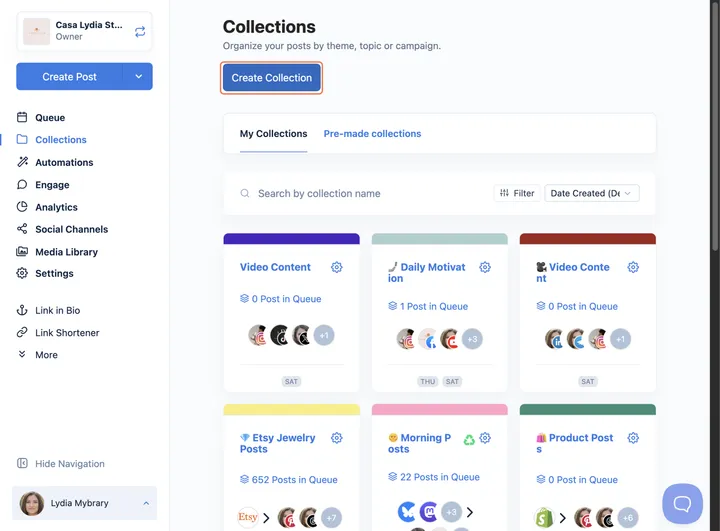
Link in Bio: Nue Bio
Nuelink's Nue Bio is included on every single plan. Fully customizable mini-website with your own domain, colors, logo, and fonts. Advanced analytics, Google Tag and Facebook Pixel integration, and a mini shopfront to sell up to 10 products directly from your bio.
SocialPilot has no Link in Bio feature at all.

A Deeper Integration Ecosystem
SocialPilot integrates with Canva, Dropbox, Google Drive, and connects to major social platforms. For content creation and basic media management, that covers the essentials.
Nuelink connects your entire content operation:
⚙️ Workflow automation: Zapier, Make, Pabbly, IFTTT, n8n, Integrately, Activepieces, FlowMattic
☁️ Cloud storage: Dropbox, Google Drive, OneDrive, and Box
🎨 Design and media: Canva and Unsplash
🛒 Ecommerce: Shopify, WooCommerce, Etsy, Squarespace, Wix, and Weebly
🎙️ Podcasts: Buzzsprout, Captivate, Castos, and more
📰 Blogging and content: Any RSS feed, WordPress, Medium, Substack

Nuelink vs SocialPilot: What You Actually Pay
Nuelink Pricing
| Plan | Monthly | Yearly | Brands | Channels |
|---|---|---|---|---|
| Standard | $18/mo | $12/mo | 1 | 7 |
| Premium | $48/mo | $30/mo | 2 | 20 |
| Business | $78/mo | $46/mo | 4 | 40 |
| Agency | $128/mo | $70/mo | 10 | 100 |
| Agency Plus | $228/mo | $114/mo | 30 | 300 |
✅ 7-day free trial on all plans.
✅ 30-day money-back guarantee. No questions asked.
✅ Customer support from day one for all plans.
✅ You are not capped by monthly post limits. Only queue limits.
✅ No hidden add-ons for essentials like automation or analytics.
SocialPilot Pricing
| Plan | Monthly | Accounts | Users | Key Features |
|---|---|---|---|---|
| Essentials | $20/mo | 5 | 1 | Scheduling, content library, analytics, 500 AI credits |
| Standard | $40/mo | 10 | 3 | + Bulk schedule, social inbox, team collaboration, 1,000 AI credits |
| Premium | $100/mo | 20 | 6 | + Advanced analytics, client approval, white-label reports, 5,000 AI credits |
| Ultimate | $200/mo | 40 | Unlimited | + Advanced white label, advanced security, dedicated account manager, unlimited AI credits |
| Enterprise | Custom | Custom | Custom | API access, SSO, migration and onboarding |
A few things worth noting:
- The Essentials plan only includes 5 social accounts and 1 user. Analytics, social inbox, and bulk scheduling are not included until the Standard plan at $40/month.
- Client approval workflows and white-label reporting require the Premium plan at $100/month.
- Extra accounts cost $4 per account per month on all plans.
- Extra users cost $5 per user per month on Standard and Premium plans.
- No money-back guarantee.
- No free plan. Trial only.
Looking for more options? If SocialPilot is not the right fit, we have rounded up the best SocialPilot alternatives for 2026 with pricing, feature breakdowns, and automation comparisons. See the full list!
What Review Platforms Say About SocialPilot
The clearest way to judge any tool is by hearing from the people who actually pay for it and rely on it every day. Marketing claims are easy to make, but real user experiences are much harder to fake.
That is why review platforms matter, and why it is always smart to see what actual customers are saying before choosing any tool.
SocialPilot Score on G2
SocialPilot holds a 4.5 out of 5 on G2 from 841 verified reviews.
SocialPilot Score on Capterra
SocialPilot holds a 4.4 out of 5 on Capterra from 375 verified reviews.
SocialPilot Score on Trustpilot
SocialPilot holds a 3.0 out of 5 on Trustpilot from 34 reviews, with 73% of those being one-star ratings.
Three Recurring Complaints From SocialPilot Users
After going through reviews on Trustpilot, G2, and Capterra, the same frustrations appear again and again.
📝 Note: All complaints below are sourced directly from verified reviews on third-party platforms.
1. Cancellation is difficult and billing continues after attempts to cancel
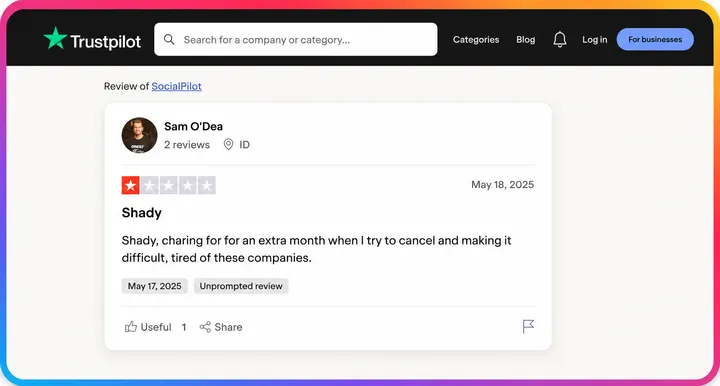
One verified Trustpilot reviewer writes: “Shady, charging for an extra month when I try to cancel and making it difficult, tired of these companies.”
This is not an isolated complaint. Multiple reviewers across platforms describe friction when attempting to cancel, unexpected charges after cancellation, and difficulty getting refunds.
2. Product updates break existing workflows without warning
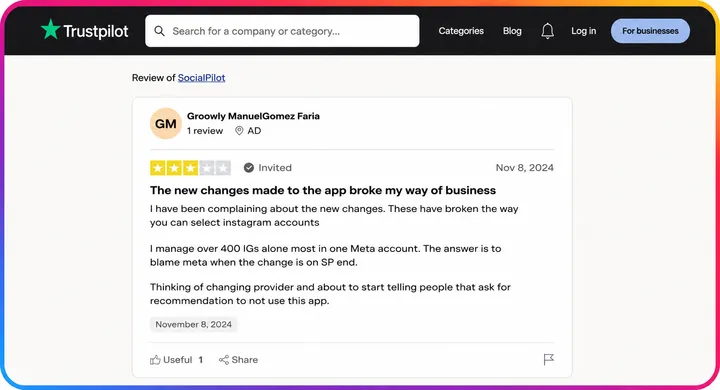
A verified Trustpilot reviewer who manages over 400 Instagram accounts writes: “The new changes made to the app broke my way of business. I have been complaining about the new changes. These have broken the way you can select Instagram accounts.”
For agencies whose entire client workflow depends on how a tool functions, unexpected breaking changes with no prior notice create real operational damage.
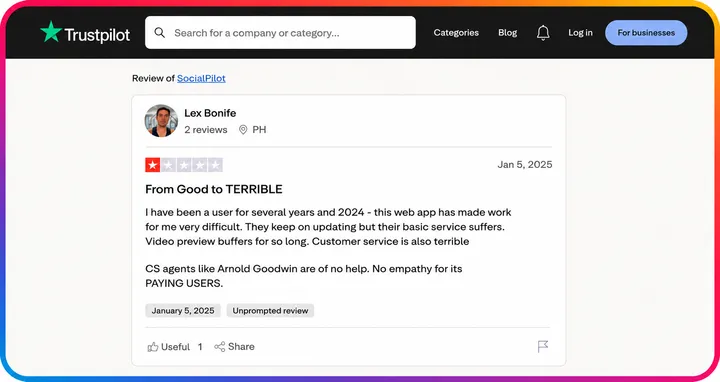
3. Reliability and customer service have declined significantly
A long-term user writes on Trustpilot: “I have been a user for several years and 2024 this web app has made work for me very difficult. They keep on updating but their basic service suffers. Video preview buffers for so long. Customer service is also terrible. CS agents are of no help. No empathy for its paying users.” A tool that fails silently or goes unresponsive during a client campaign causes reputational damage that extends well beyond the tool itself.
Switching from SocialPilot to Nuelink: What to Expect
For agencies, switching tools always comes with the same concern: how long will it take to rebuild everything for every client?
The answer with Nuelink is shorter than you expect.
While Nuelink does not offer a direct migration from other social media tools, the bulk scheduling feature lets you upload up to 100 posts per brand at once using a simple CSV file.
Each client gets their own brand workspace, so you import their scheduled content separately, keeping everything clean and isolated from day one.
From there, connecting each client's content sources takes minutes per brand. Once a client's blog, store, or podcast is linked, Nuelink handles their social publishing automatically going forward.
For most agencies, the onboarding process per client is a one-time setup that pays for itself in saved hours within the first week.
Learn more about Nuelink's bulk scheduling feature →
Questions about the transition? Reach out to contact@nuelink.com and the team will help you get set up.