
Nuelink vs ContentStudio: Don’t Choose Before Reading This
ContentStudio is one of the most feature-packed social media tools on the market.
Content discovery. Content curation. AI writing. Scheduling. Analytics. Automation recipes. Social inbox. Blog publishing. It tries to be the everything tool for content marketers, from finding trending articles to publishing them across every channel.
And for a certain kind of user, that is genuinely useful.
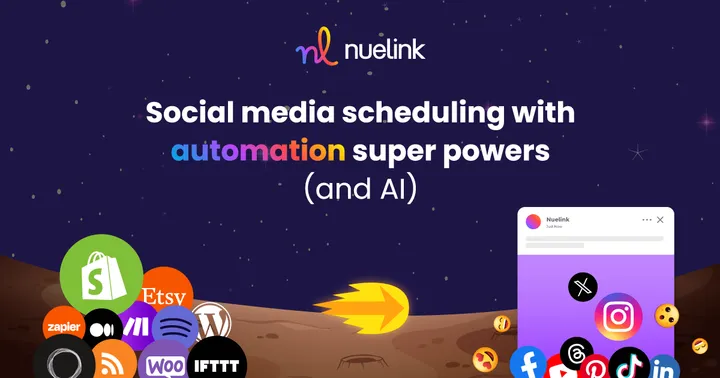
Nuelink takes the opposite approach. Less complexity, more automation. Your blog, your store, your podcast, your newsletter, all connected and publishing to social automatically, without you managing any of it.
Same category on paper. Very different in practice.
Two Tools, Two Philosophies
Nuelink was built around one idea: the best social media workflow is one you barely have to touch. Connect your content sources, set your schedules, and let the system handle distribution. It's built for creators, marketers, and agencies who want content going out consistently and automatically, not a second job managing a dashboard.
Your social media should run on autopilot.
ContentStudio was built for content marketers who want to do everything in one place. Discover trending content, curate it, write it, schedule it, track it, and report on it, all from a single platform. It's built for teams and agencies that are deeply involved in their content strategy and want a comprehensive toolkit at their fingertips.
Content marketing should be managed from one powerful hub.
Nuelink vs ContentStudio: At a Glance
| Feature | Nuelink | ContentStudio |
|---|---|---|
| Starting price | $18/month | $19/month |
| Free plan | ✅ 7-day free trial | ✅ 14-day free trial |
| Money-back guarantee | ✅ 30 days | ❌ No |
| Content recycling | ✅ Built-in | ✅ Automation recipes |
| RSS auto-posting | ✅ Yes | ✅ Yes |
| Auto-post products/podcasts | ✅ Yes | ❌ No |
| Automated crossposting | ✅ Yes | ✅ Basic |
| Analytics | ✅ Built-in, all plans | ✅ All plans |
| Link in Bio | ✅ All plans (Nue Bio) | ✅ Yes |
| Link shortener | ✅ Built-in, all plans | ✅ Via Replug integration |
| Ecommerce integrations | ✅ Shopify, WooCommerce, Etsy, Wix, Squarespace, Weebly | ❌ No |
| Content discovery | ❌ No | ✅ Yes |
| Social inbox | ✅ Built-in | ✅ All plans |
| Supported platforms | 12 | 11 |
ContentStudio Features
ContentStudio is a genuinely comprehensive tool with a strong feature set.
Here's what makes it stand out.
1. 🔍 Content Discovery
ContentStudio's discovery engine is one of its most unique features that ContentStudio offer. You can search for trending content by topic, industry, or keyword, see what's performing well, and share it directly to your social channels or use it as inspiration.
2. 📊 White-Label Analytics Reporting
ContentStudio offers analytics across all connected platforms, with white-label report customisation available on higher plans. Agencies can generate branded PDF reports for clients with a logo and custom colours.
3. 💬 Social Inbox
ContentStudio's Engage feature brings all comments and messages into a unified inbox.
4. 📝 Blog Publishing
ContentStudio can publish blog posts directly to WordPress, Medium, and Tumblr.
Features Nuelink Has That ContentStudio Simply Doesn't
ContentStudio helps you manage your content strategy. Nuelink automates the execution of it. Let's see what Nuelink offers that ContentStudio simply don't.
1. Automated Crossposting
Most people don't realise how much time they lose reposting the same content across platforms manually.
You write a caption on Instagram. Then you open LinkedIn and write it again. Then X. Then Facebook. Then TikTok. Same content, same effort, five times over every single day.
With Nuelink, you write your post once and it goes everywhere automatically. No tab switching. No copy-pasting. No repeating yourself.

2. Bulk Scheduling
With Nuelink, you can schedule hundreds of posts in one go by simply uploading a spreadsheet.
No need to create posts one by one. Just fill in your content, upload the file, and Nuelink takes care of the rest.
Joel Dakhoff.3. Ecommerce, Podcast, and Blog Automations
This is where Nuelink stands out.
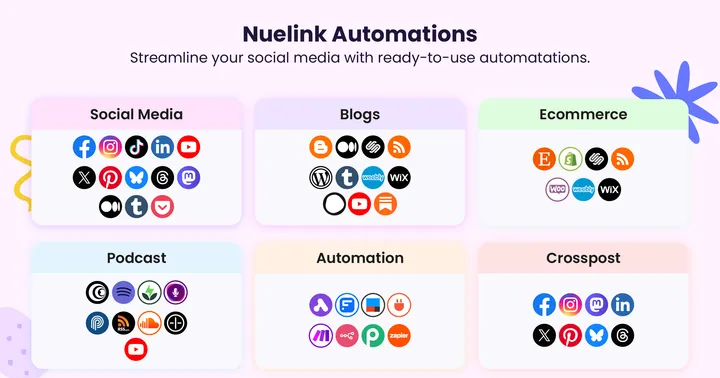
ContentStudio has RSS automation. But it has zero native integrations with e-commerce platforms or podcast hosts.
Nuelink connects directly to:
- 📝 Blog articles via RSS, WordPress, or Medium
- 🎙️ Podcast episodes via Spotify, Transistor, or any RSS feed
- 🛍️ Products via Shopify, WooCommerce, or Etsy
- 📩 Newsletters via Substack
- 🔗 Anything else via Zapier, Make, IFTTT, or Pabbly
New product goes live on your store? Nuelink posts it automatically. New podcast episode drops? Published to social media without you touching anything.
ContentStudio simply doesn't do this.
4. Collections System
Nuelink organizes your content into Collections. Smart folders by theme, campaign, or content type, each with its own queue and schedule. Multiple content streams running simultaneously, zero chaos.
ContentStudio has a content calendar and scheduling categories, but not the same organized multi-stream system that Collections provides.
 Nuelink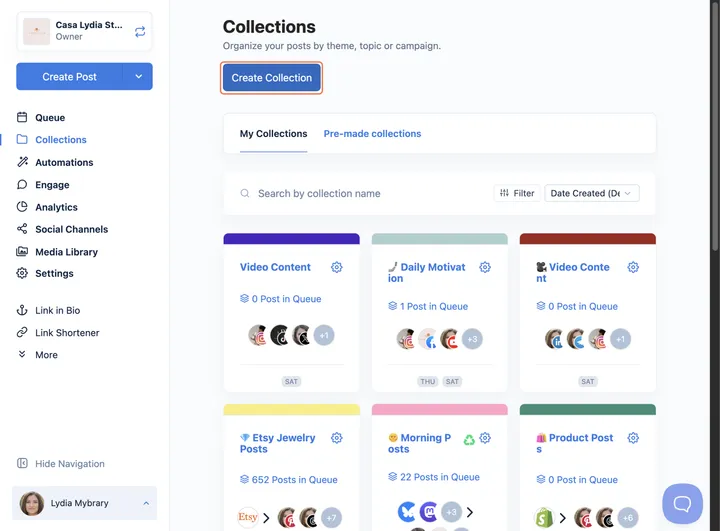
5. Integration Ecosystem
ContentStudio integrates with Canva, Unsplash, GIPHY, Zapier, and a handful of link shorteners. Solid for content creation workflows.
Nuelink goes deeper across every category that matters for distribution:
⚙️ Workflow automation: Zapier, Make, Pabbly, IFTTT, n8n, Integrately, Activepieces, FlowMattic
☁️ Cloud storage: Dropbox, Google Drive, OneDrive, and Box
🎨 Design and media: Canva and Unsplash
🛒 E-commerce: Shopify, WooCommerce, Etsy, Squarespace, Wix, and Weebly
🎙️ Podcasts: Buzzsprout, Captivate, Castos, and more
📰 Blogging and content: Any RSS feed, WordPress, Medium, Substack
Nuelink vs ContentStudio: What You Actually Pay
Nuelink pricing
Nuelink uses a flat-rate model. You pick a plan based on how many brands, channels, and team members you need.
No add-ons. No per-channel fees. No surprises.
| Plan | Monthly | Yearly | Brands | Members | Channels | Automations | Queue | AI Credits | Link in Bio |
|---|---|---|---|---|---|---|---|---|---|
| Standard | $18/mo | $12/mo | 1 | 1 | 7 | 7 | 100 posts | 100 | 1 |
| Premium | $48/mo | $30/mo | 2 | 2 | 20 | 20 | 365 posts | 200 | 2 |
| Business | $78/mo | $46/mo | 4 | 4 | 40 | 40 | Unlimited | 500 | 4 |
| Agency | $128/mo | $70/mo | 10 | 10 | 100 | 100 | Unlimited | 750 | 10 |
| Agency Plus | $228/mo | $114/mo | 30 | 30 | 300 | 300 | Unlimited | 1000 | 30 |
Every plan includes the full feature set from day one. Nothing is locked behind a higher tier.
✅ 7-day free trial on all plans.
✅ 30-day money-back guarantee. No questions asked.
✅ Annual plans save up to 50%.
ContentStudio pricing
ContentStudio's pricing looks simple at first glance. But the details tell a different story.
| Plan | Monthly | Yearly | Workspaces | Social Accounts | Users | Posts/Month |
|---|---|---|---|---|---|---|
| Standard | $19/mo | $14/mo | 1 | 5 | 1 | Unlimited |
| Advanced | $49/mo | $32/mo | 2 | 10 | 2 | Unlimited |
| Agency Unlimited | $99/mo | $65/mo | Unlimited | 25+ | Unlimited | Unlimited |
What those numbers don't show is the add-on structure baked into the Advanced plan. The moment you need more than what the base plan includes, the fees stack up:
- Extra workspace: +$10 each
- Extra social account: +$5 each
- Extra user: +$10 each
What Review Platforms Say About ContentStudio
Nothing gives you better clarity on whether a tool is worth using than seeing what real users say about it.
Reviews and scores on platforms like G2 are one of the closest indicators.
So, how does ContentStudio perform on those platforms?
ContentStudio Score on G2
ContentStudio has 372 reviews on G2 with a 4.6 out of 5 rating.
ContentStudio Score on Capterra
ContentStudio holds a 4.7 out of 5 on Capterra from 673 reviews.
Recurring Complaints From ContentStudio Users
After going through reviews across many review platforms, the same frustrations appear again and again.
📝 Note: All complaints below are sourced directly from verified reviews on third-party platforms. Nothing here is made up or exaggerated.
1. Pricing gets expensive for multiple accounts
Some reviewers feel the pricing is high for beginners or when managing multiple accounts, and find cancellation difficult. The Standard plan's 5-account limit means agencies with real client loads quickly hit the ceiling and face add-on fees on the Advanced plan or a jump to the Agency tier.
2. The Discover feature shows outdated results
Capterra users specifically flag that the "discover" feature sometimes shows outdated results, which undermines one of ContentStudio's core selling points. For users relying on it for content curation, stale content suggestions significantly reduce the tool's value.
Nuelink vs ContentStudio? Who Should Pick Which?
As mentioned above, Nuelink and ContentStudio follow different philosophies.
That means each tool is better suited for a different type of user.
Let’s break down who should choose Nuelink and who would be a better fit for ContentStudio.
Choose Nuelink if you are...
- A creator, blogger, or podcaster who wants content publishing on autopilot
- An ecommerce brand with products, a podcast, or a blog to auto-post
- A small to mid-size team that wants automation without managing a complex platform
- An agency managing multiple brands at a predictable flat rate
- Someone who values simplicity, automation, and a tool that runs in the background.
- A creator who wants a complete social media management tool with an affordable entry plan.
Choose ContentStudio if you are...
- A content marketer or agency that actively curates and discovers content as part of your strategy
- A team that needs white-label reporting for client deliverables
Looking for more options? If ContentStudio is not the right fit, we have rounded up the best ContentStudio alternatives for 2026 with pricing, feature breakdowns, and automation comparisons. See the full list!
Why Choose Nuelink Over ContentStudio?
ContentStudio is a solid choice for teams looking for a full content marketing hub. It offers discovery features, AI writing, and white-label reporting, which can be useful for agencies.
But for most users, it is more than what they actually need. The automation layer is limited when it comes to real use cases.
Nuelink is built with a different focus. Automation is at the core of everything.
- Automatically share products from Shopify or Etsy
- Auto-publish blog posts and RSS content
- Distribute podcast episodes without manual work
- Recycle evergreen content through collections
- Crosspost content across multiple platforms
- And the list goes on...
Instead of managing content, you set up systems that run on their own.
Nuelink starts at $18 per month and includes all of these automations from day one, along with a 30-day money-back guarantee.
If you are deciding today, Nuelink is the smarter starting point for users who want results without constant manual work.

Leaving ContentStudio? Here's How to Make the Switch
If switching from ContentStudio to Nuelink feels like the right choice, then moving to Nuelink is straightforward. You don't need to rebuild your content calendar from scratch. Nuelink's bulk scheduling feature lets you upload up to 100 posts at once using a simple CSV file, so your scheduled content comes with you.
The bigger win comes after the switch. Every content source you were managing manually in ContentStudio, your blog, your store, your podcast, your newsletters, or even an RSS feed, connects directly to Nuelink and starts publishing automatically.
Learn more about Nuelink's bulk scheduling feature →
If you have questions about switching from ContentStudio to Nuelink, reach out to contact@nuelink.com and the team will help you get set up.