
Nuelink vs Social Champ: Budget-Friendly and Automation?
Social Champ makes two very specific claims that are worth examining closely.
Open their website, and the meta title tells you everything: "Social Champ: Budget-Friendly Social Media Management Tool."
Open their homepage, and the next line reads: "Social Champ is an enterprise-grade social media automation tool that automates, optimizes, and analyzes content across 12+ platforms from a single dashboard."
Two big claims: Budget-friendly and Automation tool. Both are worth testing. So that is exactly what we are going to do in this article.
We will put Social Champ's pricing under a microscope and see whether it is actually budget-friendly.
Then we will look at what Social Champ actually automates and compare it head-to-head against what Nuelink automates.
By the end of this article, you will know which tool earns those claims and which one is just using them as marketing language.
Let's get into it.
Part One: Is Social Champ Actually Budget-Friendly?
This is the headline claim. “Budget-friendly.” It is right there in the meta title that Google shows every time someone searches for the tool.
Let’s find out...
How Social Champ Pricing Actually Works
Social Champ uses a per-profile pricing model. You pay based on the exact number of social media profiles you want to connect.
Each individual social account counts as one profile. Your Instagram account is one profile. Your LinkedIn page is another. Your TikTok is another. Your Facebook Page is another.
The Starter plan costs $5 per profile per month on monthly billing.
The Growth plan costs $9 per profile per month on monthly billing.
| Plan | Monthly | Profiles | Users | Key Features |
|---|---|---|---|---|
| Starter (per profile) | $5/profile | Your choice | 1 | Unlimited scheduling, bulk upload, RSS feeds |
| Growth (per profile) | $9/profile | Your choice | Unlimited | + Social listening, white-label reporting, Link in Bio |
At first glance, $5 per profile looks very affordable. But this is exactly the same trick Buffer uses. The number looks small until you multiply it.
Learn more about Buffer’s pricing and how it compares to Nuelink 👇
 Yahya
Yahya
What You Actually Pay at Real-World Scale
Here is what happens when you run the numbers for realistic usage scenarios:
| Scenario | Social Champ (Starter) | Social Champ (Growth) | Nuelink |
|---|---|---|---|
| 7 profiles | $35/mo | $63/mo | $18/mo |
| 20 profiles | $100/mo | $180/mo | $48/mo |
| 40 profiles | $200/mo | $360/mo | $78/mo |
| 100 profiles | $500/mo | $900/mo | $128/mo |
At 7 profiles, Social Champ already costs nearly double what Nuelink charges. At 20 profiles, Social Champ's Growth plan costs $180 per month. Nuelink's Premium plan covers 20 channels for $48 per month.
That is not budget-friendly. That is per-profile pricing dressed up with a low entry number.
Part Two: Is Social Champ Actually a Social Media Automation Tool?
The homepage describes Social Champ as an "enterprise-grade social media automation tool that automates, optimizes, and analyzes content across 12+ platforms."
That is a strong claim. Let's look at what Social Champ actually automates.
What Social Champ Automates
To be fair, Social Champ does have real automation features:
RSS Auto-Posting: Connect an RSS feed and Social Champ will automatically publish new posts from your blog or news source. This is a genuine automation feature.
Content Recycling: Schedule evergreen posts to repeat automatically after a set interval. Useful for keeping your best content circulating without manual effort.
These are nice features, but they are also the same features that almost every scheduling tool in this category has had for years.
RSS auto-posting and content recycling are not big differentiators.
What Nuelink Actually Automates
Nuelink was designed from the ground up around automation as the primary use case, not a secondary feature.
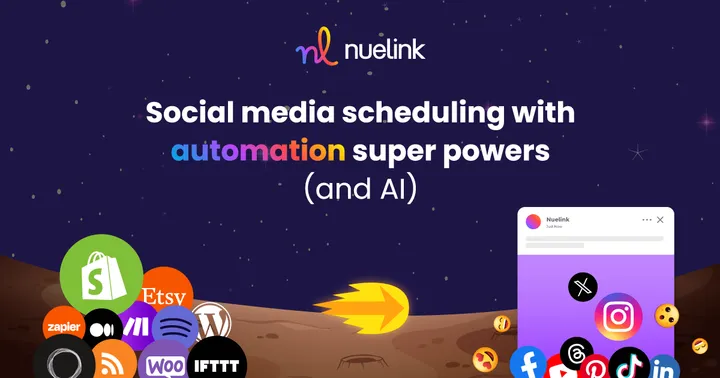
Connect your content sources, and Nuelink publishes them the moment they go live:
- 📝 Blog articles via RSS, WordPress, or Medium
- 🎙️ Podcast episodes via Buzzsprout, Captivate, Castos, or any RSS feed
- 🛍️ Products via Shopify, WooCommerce, Etsy, Squarespace, Wix, and Weebly
- 📩 Newsletters via Substack
- 🔗 Anything else via Zapier, Make, IFTTT, Pabbly, n8n, Integrately, Activepieces, or FlowMattic
New product published on your store? Your social channels post it automatically. New podcast episode live? Promoted across every platform without you touching anything. New blog post? Out on social the moment it goes up.

The Automation Gap in One Paragraph
Social Champ automates the distribution of content you already put into it manually.
Nuelink automates the sourcing, creation trigger, and distribution of content from systems you already use.
Those are fundamentally different things.
The verdict on "automation tool": Social Champ is a scheduling tool with automation features. Nuelink is an automation-first platform that includes scheduling. If your goal is to reduce the manual work involved in social media publishing then Nuelink is clearly your best option in this comparison.
Looking for more options? If Social Champ is not the right fit, we have rounded up the best Social Champ alternatives for 2026 with pricing, feature breakdowns, and automation comparisons. See the full list!
What Else Nuelink Does That Social Champ Doesn't
Beyond the automation and pricing comparison, there are specific features in Nuelink that Social Champ simply does not offer.
Automated Crossposting
With Nuelink, you write your post once, and it goes everywhere automatically. No tab switching. No copy-pasting. No repeating the same caption across five platforms every single day.
Collections System
Nuelink organizes your content into Collections. Smart folders by theme, campaign, or content type, each with its own queue and schedule. Multiple content streams running simultaneously, cleanly organized.
Social Champ has a calendar and scheduling categories. No equivalent multi-stream, organized queue system exists.
 Nuelink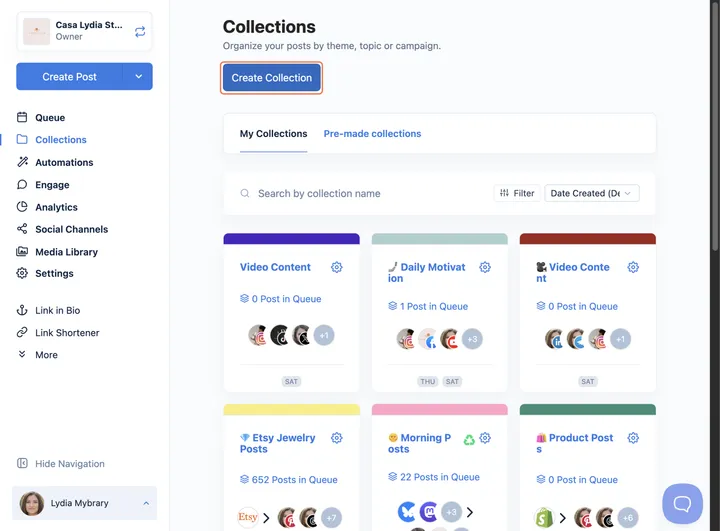
Built-In Link Shortener
Every Nuelink plan includes a native link shortener with click tracking and a custom domain.
Social Champ handles link shortening through a Bitly integration. That means a third-party account to manage and Bitly's own branding unless you are on a paid Bitly plan.
A Deeper Integration Ecosystem
Social Champ integrates with Canva, Google Drive, Dropbox, OneDrive, ChatGPT, WordPress, and Bitly. A reasonable set for content creation workflows.
Nuelink goes significantly further for distribution:
⚙️ Workflow automation: Zapier, Make, Pabbly, IFTTT, n8n, Integrately, Activepieces, FlowMattic
☁️ Cloud storage: Dropbox, Google Drive, OneDrive, and Box
🎨 Design and media: Canva and Unsplash
🛒 Ecommerce: Shopify, WooCommerce, Etsy, Squarespace, Wix, and Weebly
🎙️ Podcasts: Buzzsprout, Captivate, Castos, and more
📰 Blogging and content: Any RSS feed, WordPress, Medium, Substack
Switching from Social Champ to Nuelink: What to Expect
While Nuelink does not offer a direct migration from other social media tools, its bulk scheduling feature lets you upload up to 100 posts at once using a simple CSV file. Your existing scheduled content moves over without rebuilding everything from scratch.
From there, connecting your content sources takes minutes. Once your blog, store, or podcast is linked, Nuelink handles publishing automatically from that point forward.
Learn more about Nuelink's bulk scheduling feature →
Questions about the transition? Reach out to contact@nuelink.com and the team will help you get set up.