
Nuelink vs Vista Social: Two Very Different Approaches to Automation
Vista Social is genuinely one of the most well-reviewed social media tools in its category.
It holds a 4.8 out of 5 on G2 from 1,071 reviews, ranking as the number one easiest-to-use platform in its space.
But the feature that stands out the most is its DM automations.
Vista Social lets you automatically reply to comments and messages using keyword triggers and workflows. If someone comments on a post or sends a DM, you can instantly respond, guide them, or push them into a funnel. For engagement and customer communication, this is powerful.
However, this type of automation starts after the content is already live. You still need to create the post, write its caption, schedule it, and publish it.
This is where Nuelink takes a completely different approach to automation. Instead of focusing on what happens after someone engages, Nuelink focuses on everything that happens before.
You connect your blog, your ecommerce store, your podcast, or your newsletter, and from that point on, content is automatically turned into social posts and published across your channels without manual work.
Two different types of automation.
So, let's see how these two are comparing to each other...
Vista Social Features
Vista Social is a feature-rich platform built for social media managers, agencies, and teams who want full control over their social presence from one dashboard.
1. 📬 Unified Social Inbox
Vista Social centralizes messages, mentions, DMs, and comments from Facebook, Instagram, TikTok, Threads, and LinkedIn into a single real-time inbox.
2. 🤖 DM Automations
Vista Social’s DM Automations allow you to set up automated replies to comments and direct messages using keyword triggers and workflows.
3. 👂 Social Listening
Vista Social includes social listening, allowing you to monitor brand mentions, track competitors, and follow industry conversations without needing a separate tool.
4. ⭐ Review Management
Vista Social lets you manage reviews across Facebook, Google, Yelp, TripAdvisor, and Trustpilot from one dashboard.
Features Nuelink Has That Vista Social Simply Doesn't Have
Vista Social handles what happens around your content after you create it.
Nuelink handles the creation and distribution of that content automatically, before you ever have to think about it.
Automated Crossposting
With Nuelink, you write your post once, and it goes everywhere automatically. No tab switching. No copy-pasting. No repeating the same caption across five platforms every single day.
For someone publishing daily across multiple platforms, that is easily an hour back in your day, every day.

Bulk Scheduling
With Nuelink, you can schedule hundreds of posts in one go by simply uploading a spreadsheet.
No need to create posts one by one. Just fill in your content, upload the file, and Nuelink takes care of the rest.
Joel Dakhoff.Automations That Actually Save Time
This is where Nuelink pulls clearly ahead of Vista Social.
Connect your content sources and Nuelink publishes them to social media automatically the moment they go live:
- 📝 Blog articles via RSS, WordPress, or Medium
- 🎙️ Podcast episodes via Spotify, Transistor, or any RSS feed
- 🛍️ Products via Shopify, WooCommerce, or Etsy
- 📩 Newsletters via Substack
- 🔗 Anything else via Zapier, Make, IFTTT, or Pabbly
Vista Social has none of these. Every post you publish starts from scratch, manually composed and manually scheduled inside the platform.
Collections System
Nuelink organizes your content into Collections. Smart folders by theme, campaign, or content type, each with its own queue and schedule. Multiple content streams running simultaneously, cleanly organized.
Vista Social has a content calendar and scheduling tools, but no equivalent multi-stream, organized queue system.
 Nuelink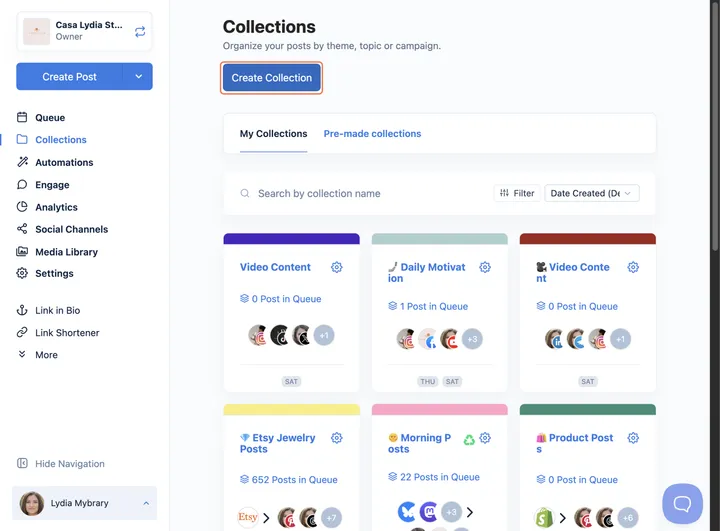
Link in Bio — Nue Bio
Nuelink's Nuebio is included on every single plan. It is a fully customizable mini-website with your own colors, logo, and fonts. It supports links to your store, blog, podcast, newsletter, Calendly, and more.
It includes advanced analytics, Google Tag and Facebook Pixel integration, and a mini shopfront to sell up to 10 products directly from your bio.
Vista Social also has a Link in Bio tool called Vista Page. It is functional and well-designed. Nuebio goes further with native ecommerce capabilities and deeper customization on every plan without restrictions.
Built-In Link Shortener
Every Nuelink plan includes a native link shortener with click tracking and a custom domain, so your short links carry your brand.
Vista Social has no built-in link shortener.
A Deeper Integration Ecosystem
Vista Social integrates with Canva and connects to major social platforms.
Nuelink connects your entire content operation:
⚙️ Workflow automation: Zapier, Make, Pabbly, IFTTT, n8n, Integrately, Activepieces, FlowMattic
☁️ Cloud storage: Dropbox, Google Drive, OneDrive, and Box
🎨 Design and media: Canva and Unsplash
🛒 Ecommerce: Shopify, WooCommerce, Etsy, Squarespace, Wix, and Weebly
🎙️ Podcasts: Buzzsprout, Captivate, Castos, and more
📰 Blogging and content: Any RSS feed, WordPress, Medium, Substack
Nuelink vs Vista Social: Different Tools for Different Jobs
When it comes to content automation and distribution, Nuelink wins clearly.
There is no equivalent to Nuelink's ecommerce integrations, podcast auto-publishing, RSS automation, or content recycling inside Vista Social. Quite frankly, there is no equivalent to Nuelink's overall automation power in the entire social media management industry, not just Vista Social.
That said, these two tools are not necessarily direct competitors. They solve different problems and can work well together.
For teams and agencies, a strong setup could look like this:
Use Nuelink to automate content distribution and keep everything publishing consistently in the background.
Use Vista Social to manage inbox, DM automations, social listening, and review management.
Nuelink vs Vista Social: What You Actually Pay
Not all pricing pages tell the full story. Some tools look affordable upfront, then lock core features behind higher tiers or add-ons.
Here is how both tools compare when you look at what you actually get from day one.
Nuelink pricing
| Plan | Monthly | Yearly | Brands | Channels |
|---|---|---|---|---|
| Standard | $18/mo | $12/mo | 1 | 7 |
| Premium | $48/mo | $30/mo | 2 | 20 |
| Business | $78/mo | $46/mo | 4 | 40 |
| Agency | $128/mo | $70/mo | 10 | 100 |
| Agency Plus | $228/mo | $114/mo | 30 | 300 |
✅ 7-day free trial on all plans.
✅ 30-day money-back guarantee. No questions asked.
✅ Customer support from day one for all plans.
✅ You are not capped by monthly post limits. Only queue limits.
✅ No hidden add-ons for essentials like automation or analytics.
Vista Social Pricing
Vista Social offers multiple pricing tiers, with paid plans starting at $79/month for the Professional plan on monthly billing.
| Plan | Monthly | Yearly | Profiles | Users | Key Features |
|---|---|---|---|---|---|
| Professional | $79/mo | $64/mo | 15 | 3 | Full publishing, inbox, analytics, review management, Vista Page |
| Advanced | $149/mo | $120/mo | 30 | 6+ | Reports, approval workflows, advanced scheduling |
| Scale | $379/mo | $304/mo | 70 | 10+ | White-label, unlimited AI credits, 25 shared calendars |
Vista Social Pricing: The Reality Check
At first impression, Vista Social’s pricing looks structured and scalable. But once you break it down, a few limitations start to stand out, especially as your needs grow.
Expensive entry point
Starts at $79/month, which is already high compared to many tools in the category.
Forced upgrades for team growth
User limits are tight (3 → 6 → 10), so adding team members quickly pushes you into higher plans.
Feature gating across tiers
Advanced features like workflows, integrations, and deeper automation are locked behind higher plans.
Pricing scales aggressively
Jump from $79 → $149 → $379/month makes scaling costly fast for agencies.
Add-ons and limits still exist
Things like advanced listening or higher DM/contact limits are restricted or require upgrades or add-ons.
What Review Platforms Say About Vista Social
Vista Social Score on G2
Vista Social holds a 4.8 out of 5 rating on G2 from 1,071 verified reviews, making it one of the highest-rated tools in the social media management category.
Vista Social Score on Capterra
Vista Social holds a 4.9 out of 5 rating on Capterra from 870 verified reviews.
Vista Social Score on Trustpilot
Vista Social holds a 4.1 out of 5 rating on Trustpilot from 62 reviews.
Switching from Vista Social to Nuelink: What to Expect
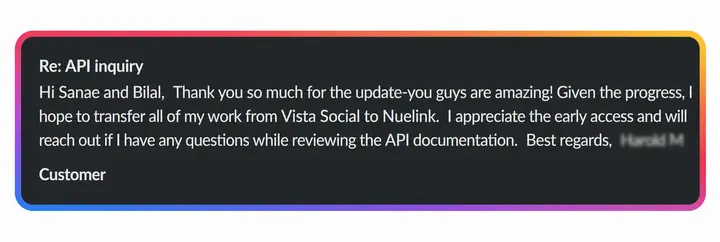
If you have been using Vista Social primarily for scheduling and are ready for a tool that handles distribution automatically, the transition to Nuelink is straightforward.
While Nuelink does not offer a direct migration from other social media tools, it comes with a powerful bulk scheduling feature that lets you upload up to 100 posts at once using a simple CSV file.
Your existing scheduled content comes with you without rebuilding everything from scratch.
From there, connecting your content sources takes minutes. Once your blog, store, or podcast is connected, Nuelink handles publishing automatically going forward.
Learn more about Nuelink's bulk scheduling feature →
If you have questions about the transition or want help getting set up, reach out to contact@nuelink.com and the team will assist you.
👉 Do the same smart move and start your 7-day free trial