

Schedule Facebook Collaborative Video Posts with Nuelink
Facebook's collaboration feature gives your Facebook pages a powerful way to expand their reach by co-authoring content with other pages.
Whether you're a brand partnering with a creator, a business teaming up with another business, or an agency managing multiple clients, Facebook Collaborative Posts let you share the spotlight.
With Nuelink, you can now schedule these collaborative posts directly from your dashboard, saving you time and keeping your content workflow in one place.
What Are Facebook Collaborative Posts?
Facebook Collaborative Posts allow two Facebook Pages to co-author a video or a reel.
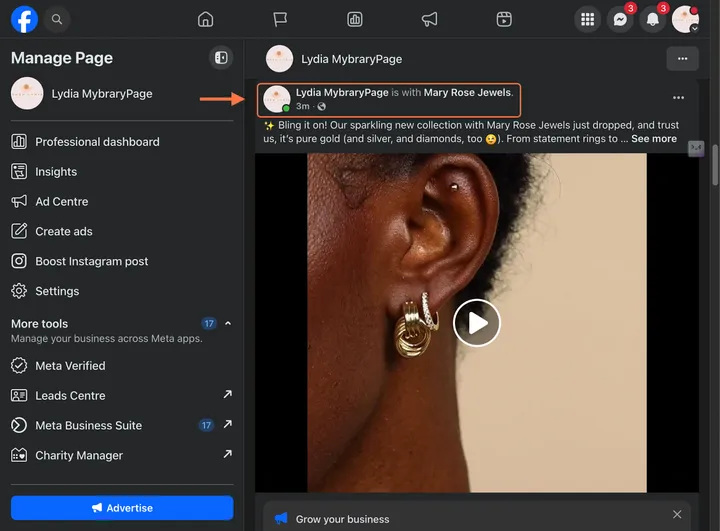
When you tag a collaborator, the post appears on both pages simultaneously, combining reach, likes, comments, and overall engagement into one shared post.
This is different from simply mentioning or tagging someone in a caption.
A collaboration means the post lives on both profiles and counts toward both Pages' engagement.
@nuelink This is what will help you expand more! Consider collabs you oother creators and pages to double your audience and reach. And the best way to make use of collabs is by scheduling beforehand on Nuelink and double-saving your time as you double your viewers. Stop skipping collabs! Try it now on Nuelink! You know where to find the link! #scheduleingtools #collaboration #cratorcollabs #brandcollabs #collaborators Collabs, collaboration with brands, collabs with creators, collabs with others, how to get collabs, how to use collabs, social media tools, scheduling tools, social media agency, marketing tools.
♬ original sound - Nuelink | AI Social Media Tool
Why Facebook Collaborative Posts Matter
Reach is one of the biggest challenges for any Facebook Page, and collaborative posts are one of the most organic ways to tackle it.
When two Pages co-author a video, both audiences are exposed to the content without either party having to pay for promotion.
This means that a brand working with a mid-size creator can instantly double its potential viewership at zero extra cost.
Beyond raw reach, collaborative posts create a stronger sense of credibility. When a page your followers already trust co-authors content with you, it acts as a social endorsement.
This is especially valuable for newer pages or brands trying to establish authority in a niche.
The combined engagement, likes, comments, shares also signal to Facebook's algorithm that the content is resonating with a broad audience, which can further amplify its organic distribution.
How to Schedule a Facebook Collaborative Video Post with Nuelink
Let’s walk you through exactly how to create and schedule a Facebook collaborative video post with Nuelink, step by step.
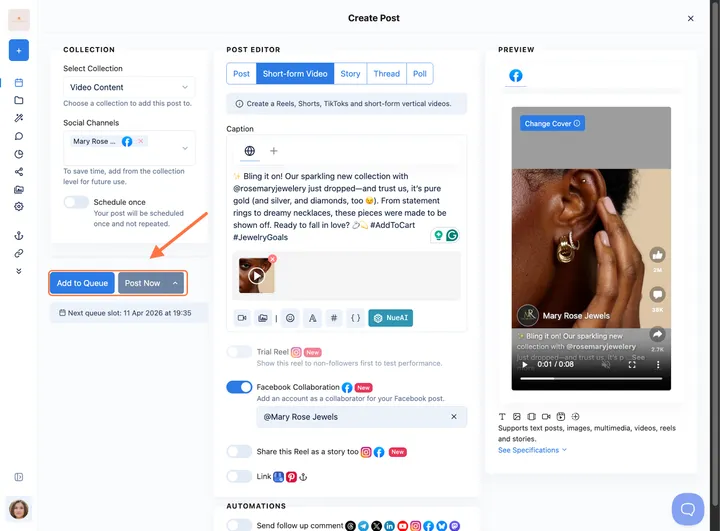
- Log in to your Nuelink account, and click on “Create Post.”
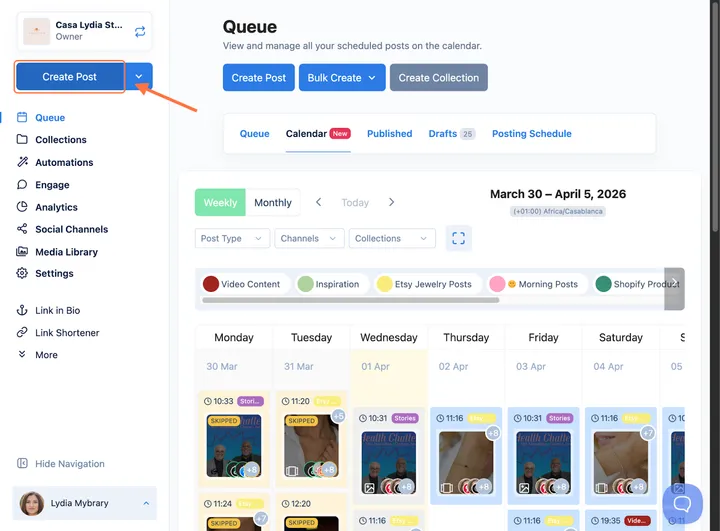
- First, you need to select your post type as “Short-form Video.”Note: Make sure it’s a short-form video because Facebook Collabs are only available for Facebook videos.
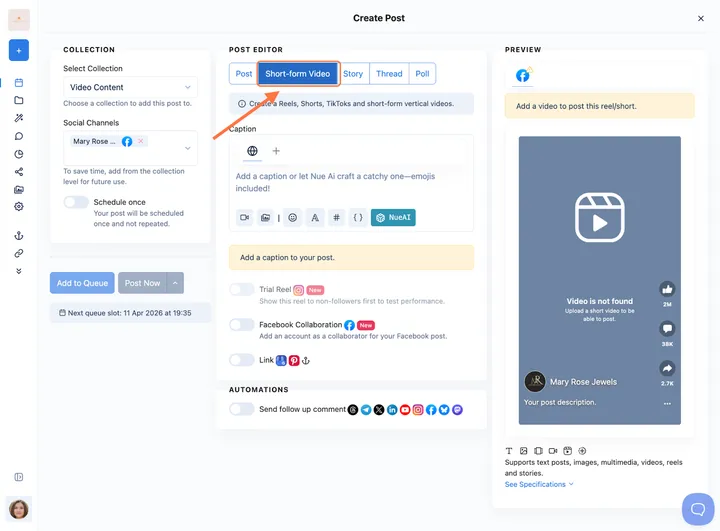
- Select your Collection and your Facebook page.
⚠️ Note: This feature is only available for Facebook pages, and not personal profiles or groups.
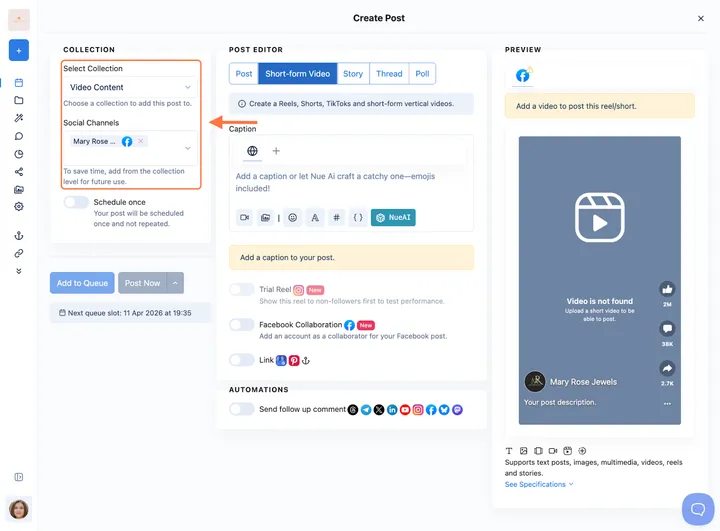
- Upload your video by clicking on Upload Video or Media Library.
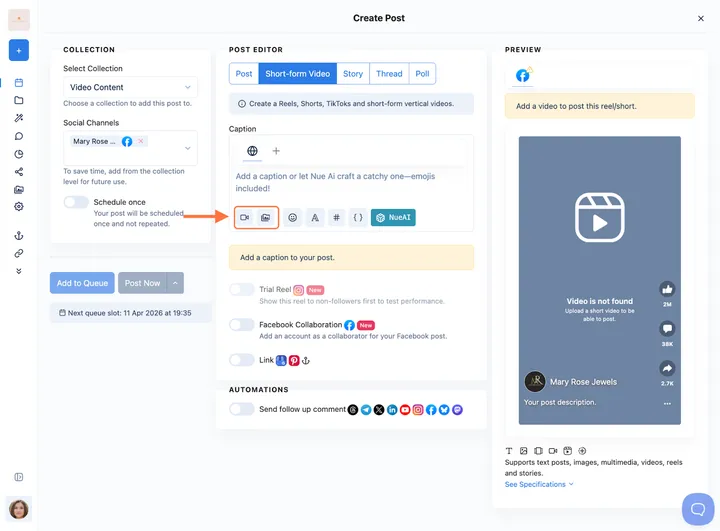
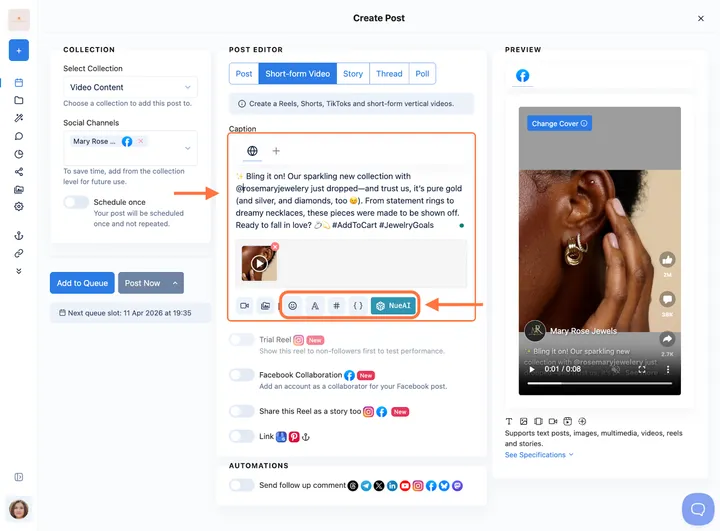
- Add your post caption, edit your cover, and enhance with NueAI and caption settings.
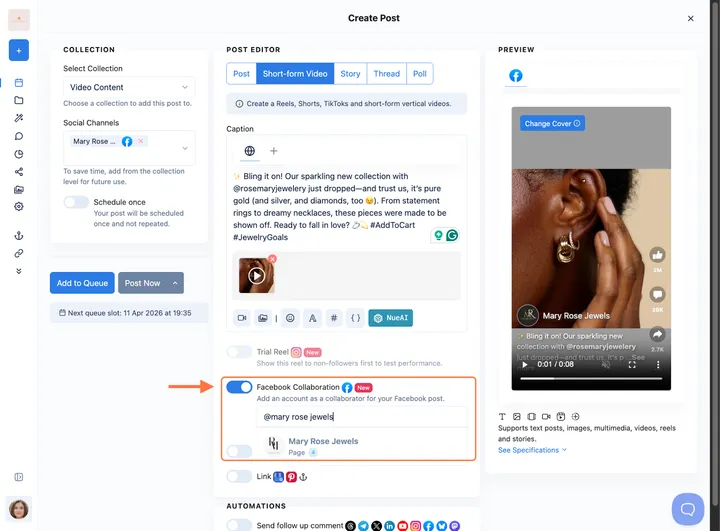
- Toggle on “Facebook Collaboration” and search for your collaborator by the name of their page, “Nuelink,” or you can just type the username “@nuelinkapp.”
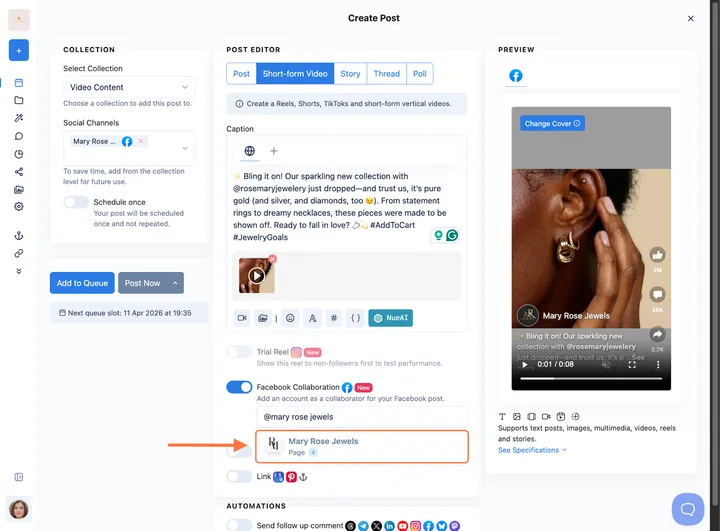
- Select the account you would like to collaborate with. Note: You can only add 1 collaborator to your videos on Facebook.
- Once done, schedule your post, add it to the queue, or post it immediately.
How to Accept a Collaboration on a Facebook Video Post?
If you’re on the other side this time and received a collaboration invite, let’s show you exactly how to accept it.
- Click on the notification “Facebook Page tagged you in a post.”
⚠️ Note: Make sure they are connected to the correct Facebook account and page.
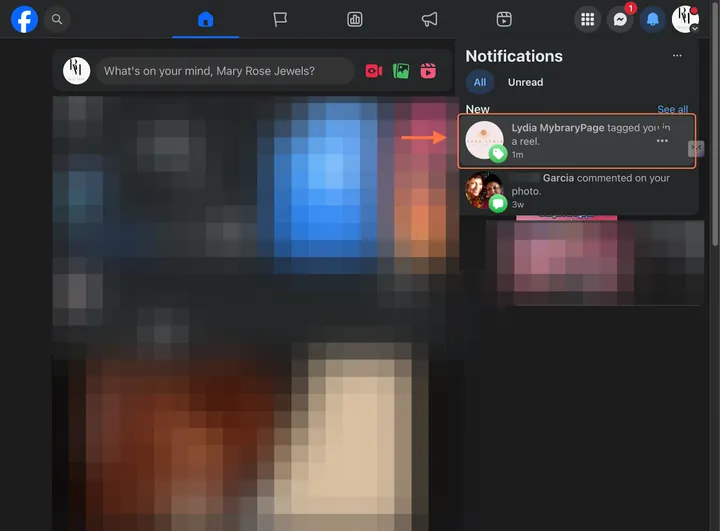
- You will find a message to accept or decline, or it will be automatically accepted.
⚠️ Note: Sometimes this may fail due to some Facebook bugs.
Also Available: Instagram Collaboration Tags
If you also manage Instagram accounts, you'll be happy to know that Nuelink supports Instagram Collaboration tags as well.
You can invite collaborators on Instagram Reels, carousels, and image posts directly from the Nuelink post editor.
Check out our Instagram Collaborations guide for a full walkthrough.
Best Practices for Facebook Collaborative Reels
Plan your collab content in advance. Coordinating with another Page takes time. Build your collaboration posts into your content calendar early so both parties can align on messaging, timing, and creative direction before the scheduled date.
Confirm your collaborator is ready to accept. Facebook requires the tagged Page to accept the collaboration invite before the post appears on both profiles. Give your collaborator a heads-up before you publish so they can act on the notification promptly.
Keep the Reel relevant to both audiences. The content should feel natural for both Pages' followers, not just yours. Collaborative Reels that feel forced or off-brand for one party tend to underperform.
Track performance on both ends. After the collab goes live, review the analytics on both Pages to understand which audience engaged more and what that tells you about future partnership opportunities.
Comment Questions About Facebook Collabs
Can I add a collaborator to any Facebook post? Collaborations are only available for Facebook videos
Can I collaborate with a personal Facebook account? No, Facebook currently only supports collaborations between pages, not personal profiles.
What happens after I invite a collaborator? Once the video is published, the invited Page should receive a Facebook notification asking them to accept or decline the collaboration. This may fail sometimes because of a Facebook bug.