

The Nuelink API Is Now Live: Connect, Schedule, and Publish via API
For a while now, Nuelink's users have been asking for the same thing: a way to connect Nuelink to their own tools, and applications without going through the dashboard.
They wanted to publish programmatically, automate content workflows, and build things we hadn't even thought of yet.
Today, that's possible. The Nuelink API is officially live!
What You Can Do With Nuelink's API
The Nuelink API lets you programmatically publish content to every social channel Nuelink supports: Facebook, Instagram, Threads, LinkedIn, Google Business, YouTube, TikTok, Pinterest, X (Twitter), Mastodon, Bluesky, and Telegram, directly from your own applications.
This first release is focused on one core workflow: creating posts, uploading media, and scheduling your posts. That covers the most important part of any publishing process. Other features will be rolled out in a later release.
Beyond basic publishing, the API gives you access to a solid set of core features:
- Access accounts, Brands, Collections, and Connected Channels
- Upload media and use it on your posts
- Create and schedule posts (add to queue, drafts, scheduled, or post now)
- Post text posts, threads, images, carousels, videos, reels/shorts, and polls
- Cross-post to 12 platforms
- Instagram and Facebook: collabs and feed controls
- TikTok: inbox delivery for final edits before posting
- YouTube: tags and playlist assignment
The Nuelink's API Endpoints Available Right Now
The current release ships with six endpoints:
GET /me:Retrieve your user profileGET /brandsList all brands on your accountGET /brands/{brandId}/collectionsList collections inside a brandGET /brands/{brandId}/channelsList connected channels for a brandPOST /brands/{brandId}/mediaUpload media filesPOST /brands/{brandId}/collections/{collectionId}/postsCreate and schedule a post
Full documentation, including request/response examples, authentication details, rate limits, and platform-specific options, is available for you to explore.
Browse the full Nuelink API documentation
A Note on Where We Are
This is a v1 Alpha release. That means endpoints and responses may evolve later. We'll announce any breaking changes via email.
Think of it less as a limitation and more as an invitation: this is the right time to build on it, give feedback, and help shape what comes next.
Who Is the Nuelink API Built For
The Nuelink API is built for anyone who wants to publish programmatically rather than manually.
Developers building internal tools, custom dashboards, or client-facing products can publish and schedule content directly into Nuelink without touching the dashboard.
AI agent users running workflows on tools like Claude Cowork or Manus can skip the browser entirely and publish straight from their pipelines.
Automation builders on Zapier, Make, or n8n can connect Nuelink to any tool in their stack and trigger publishing from anywhere.
SaaS products and content platforms that need social publishing as part of their own offering can build directly on top of Nuelink's infrastructure.
How Nuelink Is Structured
Before you make your first API call, it helps to understand how Nuelink organizes your content. Everything follows a simple four-level structure:
Account is the top level. It holds everything tied to your login: your brands, billing, and settings...
Brand is your workspace. Think of it as a separate container for a business, a client, or a project. Each brand has its own connected social channels, collections, and automations. Most users have one brand. Agencies typically have several.
Collection is a content folder inside a brand, usually organized by theme or campaign, for example "Weekly Tips" or "Product Updates." Each collection has its own default channels and posting schedule. When you publish a post to a collection, Nuelink automatically sends it to the right channels at the right time.
Channels are the connected social accounts inside a brand: your Instagram, LinkedIn, X, TikTok, and so on. You don't pass channel IDs when creating a post via the API. Instead, each collection already knows which channels it publishes to, and handles that routing automatically.
Post is the actual content. Text, images, videos, carousels, threads. It lives inside a collection and gets distributed to whichever channels that collection is configured for.
So every API call follows the same logic: pick a brand, pick a collection inside it, and post. The collection takes care of the rest.
How to Get Your Nuelink API Token
Getting your API token takes less than a minute.
Here's how:
1️⃣ Log in to your Nuelink account
2️⃣ Go to Settings from the left sidebar
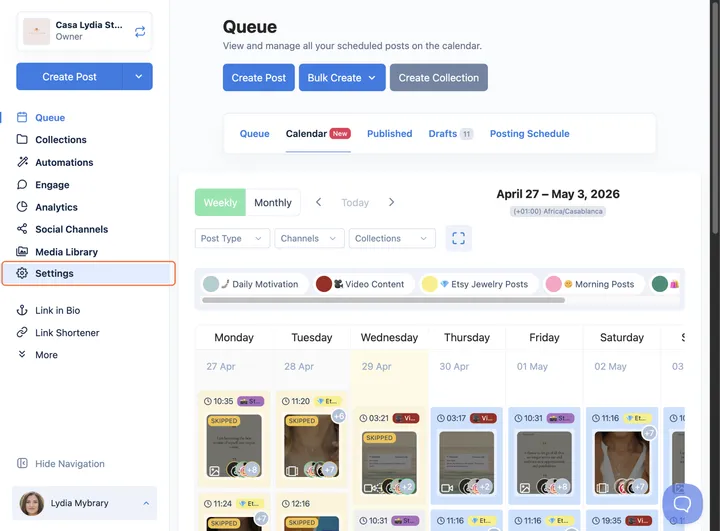
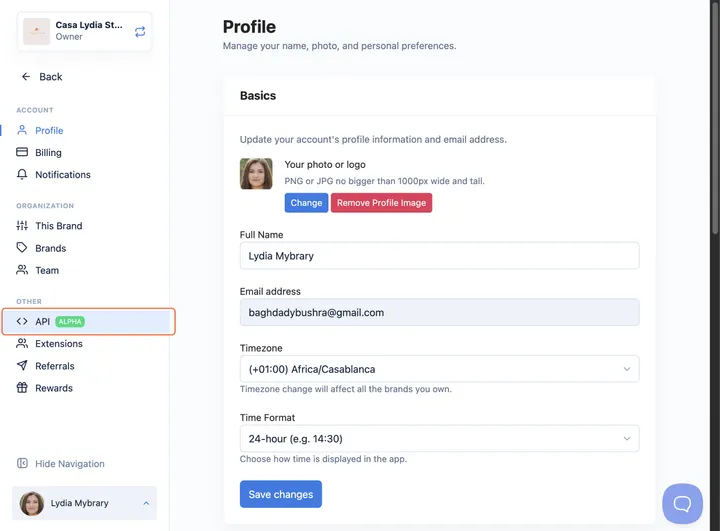
3️⃣ Under the Other section, click on API
4️⃣ Give your token a name (e.g. "Nuelink") and set an expiry
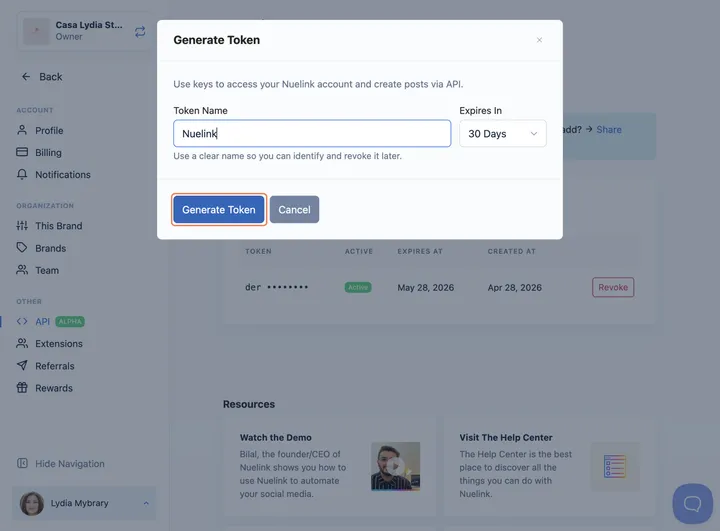
5️⃣ Click Generate Token and copy it immediately. For security reasons, you won't be able to see it again.
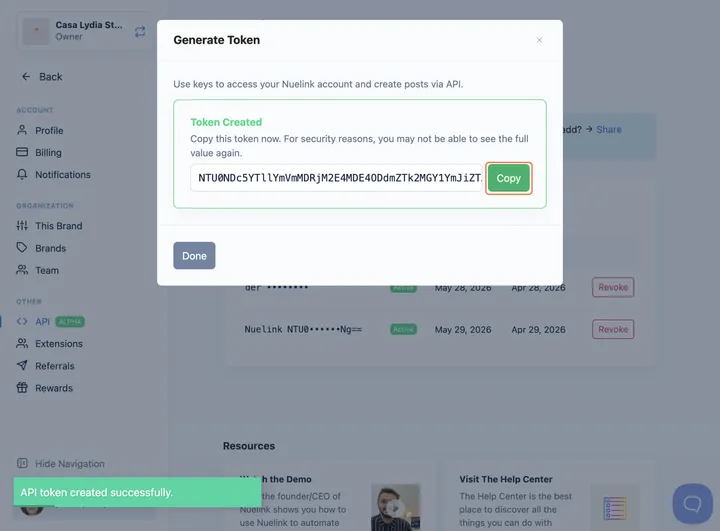
Once you have your token, you can start making API calls directly.
If you want to connect Nuelink to Claude, Manus, or any other AI agent, just replace YOUR-TOKEN in the MCP server URL with your token:
mcp.nuelink.com/mcp?api_key=YOUR_TOKENThat single URL is all you need to give any MCP-compatible tool full access to publish through Nuelink.
Nuelink + AI Agents: Direct API Connection
In our previous guides, we showed you how to give Claude Cowork and Manus access to your browser so they could open Nuelink, navigate the interface, and schedule posts on your behalf. It worked, and it was a solid starting point.
But now that the API is live, you can skip the browser entirely. Instead of pointing an AI agent at your dashboard, you can connect Nuelink directly as a custom connector using the MCP URL.
Here is how to do it on each platform.
How to Connect Nuelink to Claude as a Custom Connector
1️⃣ Open Claude and click the + button next to the chat input
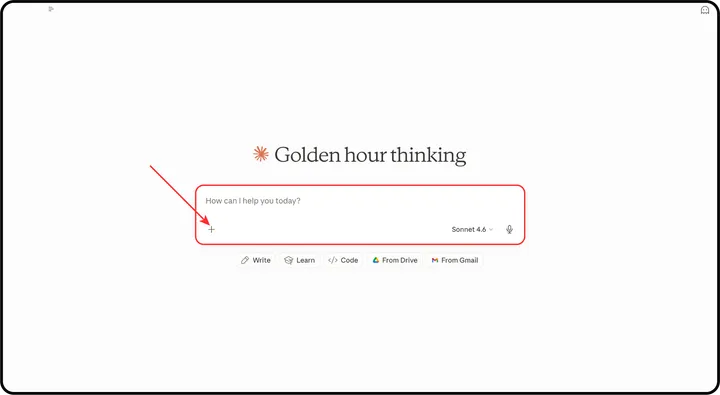
2️⃣ From the menu, select Connectors
3️⃣ Click on Manage Connectors
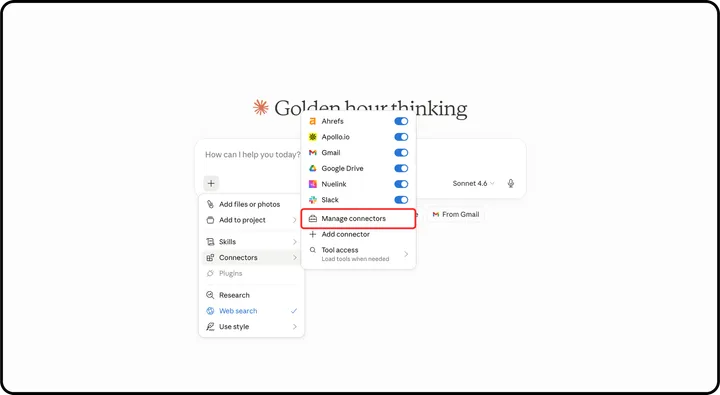
4️⃣ Click the + icon at the top of the Connectors panel to add a new one
5️⃣ Select Add custom connector
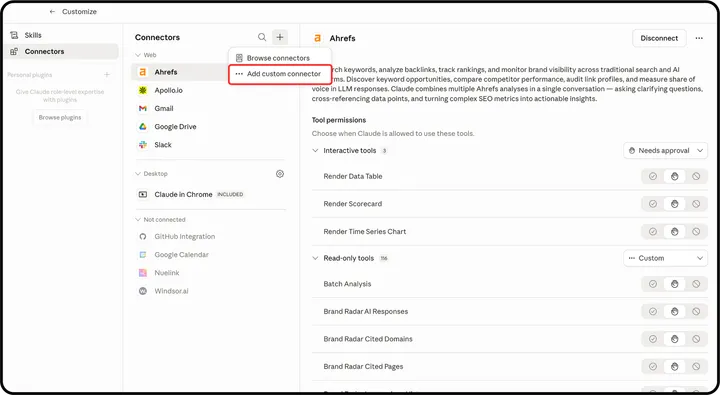
Paste the following URL and replace YOUR_TOKEN with the Nuelink API token you generated in the steps above:
https://mcp.nuelink.com/mcp?api_key=YOUR_TOKEN
Note: Make sure the URL starts with https:// when you paste it.
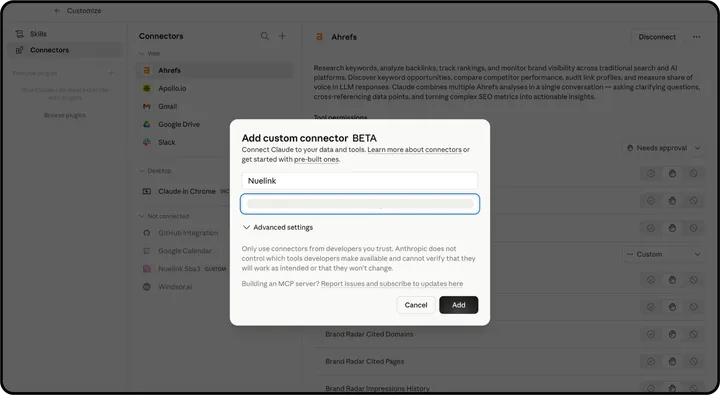
Once added, Nuelink will appear in your connectors list as a Custom connector with six available tools:
- nuelink_create_post
- nuelink_get_me
- nuelink_list_brands
- nuelink_list_channels
- nuelink_list_collections
- nuelink_upload_file
6️⃣ Set the tool permissions to your preference, and you're ready to go
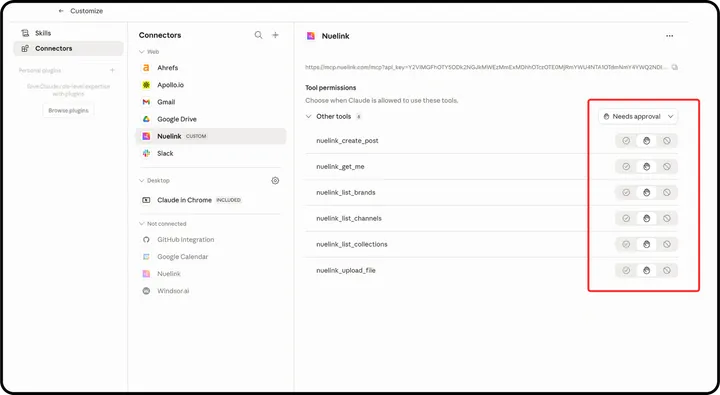
Claude can now create posts, schedule content, and manage your Nuelink account directly from any conversation.
How to Connect Nuelink to Manus as a Custom MCP
1️⃣ Open Manus and click the MCP connector icon in the chat input bar (the plug icon)
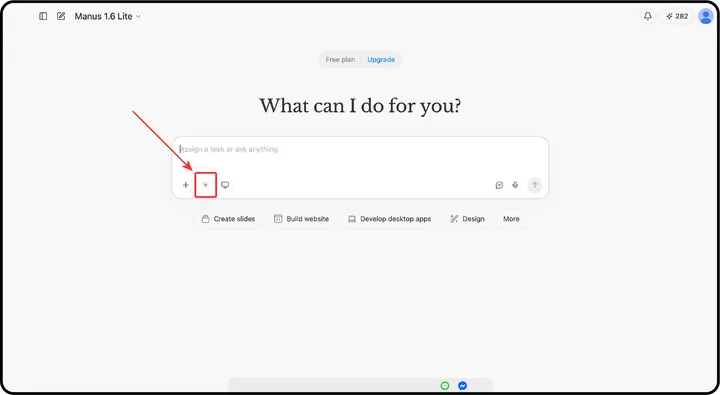
2️⃣ In the Connectors panel, click the Custom MCP tab
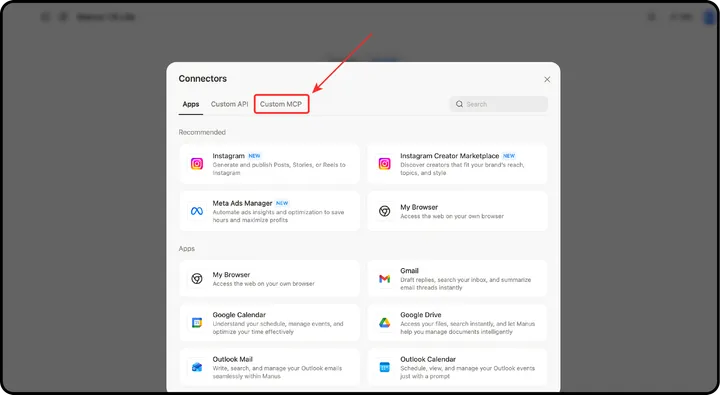
3️⃣ Click Add custom MCP and select Direct configuration
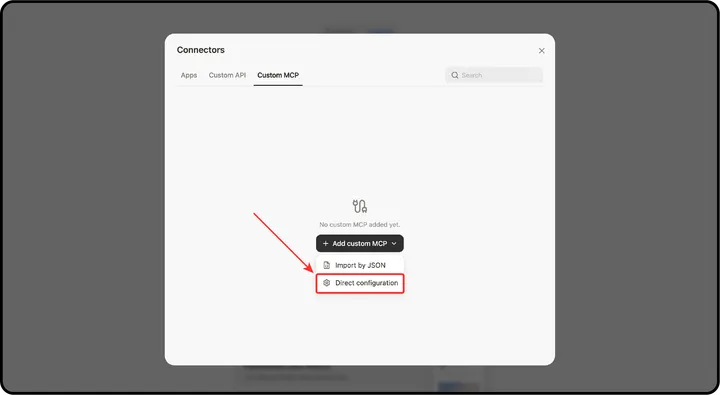
4️⃣ In the MCP configuration form, fill in the following:
- Server Name: Nuelink
- Transport Type: HTTP
- Server URL:
https://mcp.nuelink.com/mcp - Custom Headers: Add a header with the key
Authorizationand paste your Nuelink API token as the value
5️⃣ Click Save
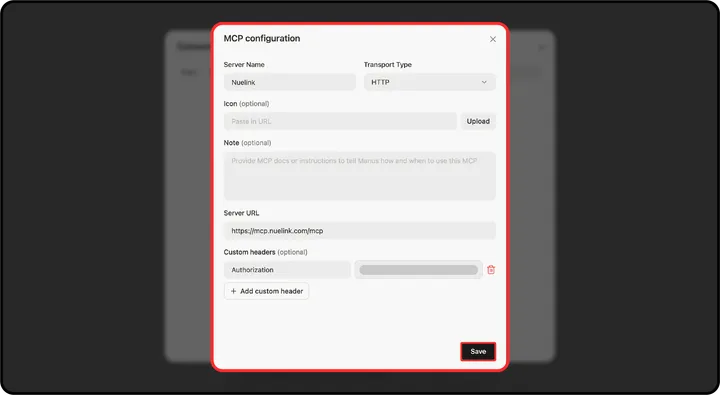
Manus can now create posts, schedule content, and manage your Nuelink account as part of any workflow you assign to it, no browser access needed.
Get Started
If you're not on Nuelink yet, start your 7-day free trial and get access to the full platform, API/MCP included.
Start your free trial →