

How to Add Music to Instagram Reels with Nuelink
Learn how to search for music, add it to your Instagram Reels, and schedule everything directly from Nuelink’s Post Editor.
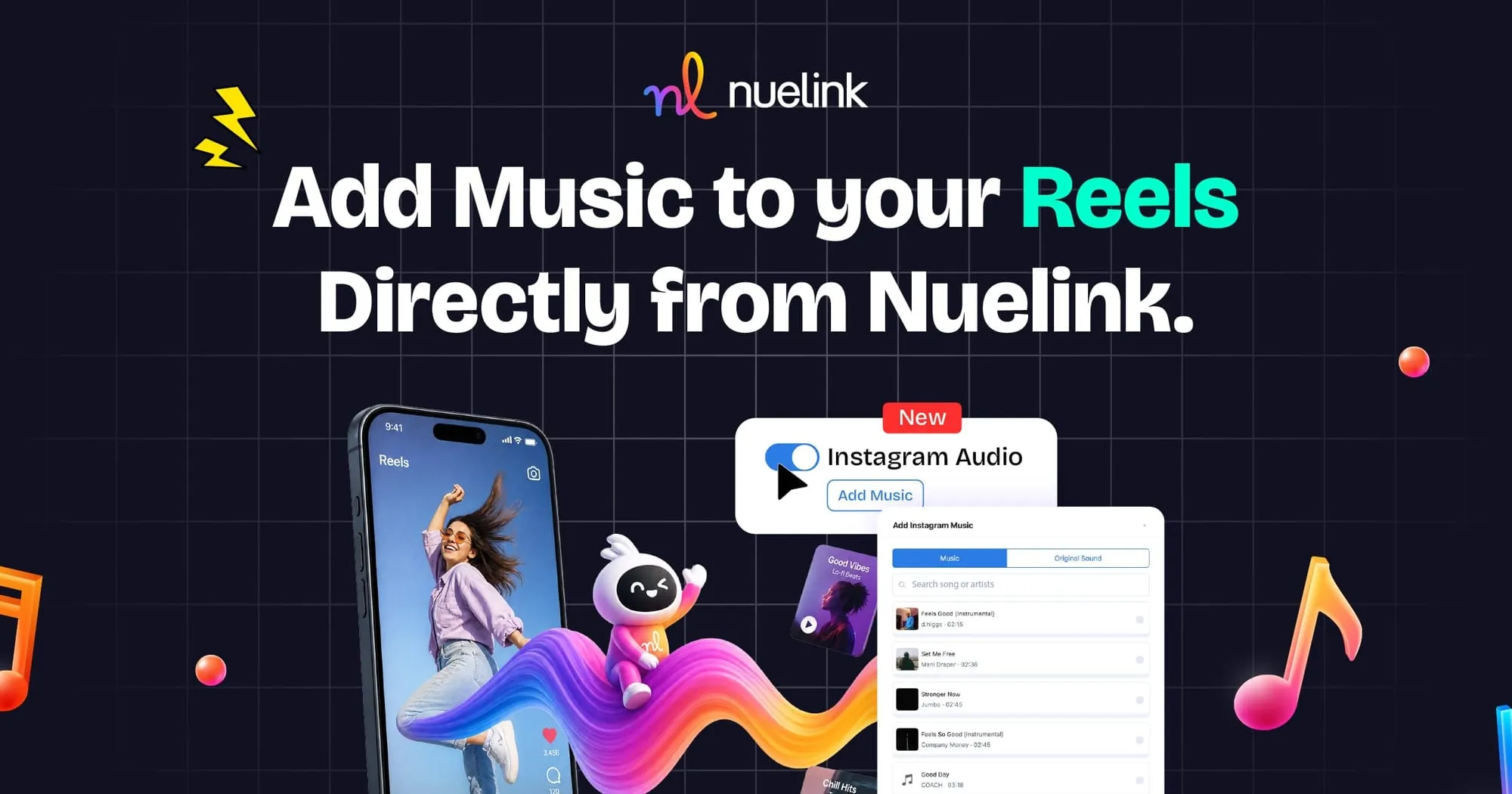
Music can completely change how an Instagram Reel feels.
The right track can make a product demonstration more engaging, give a tutorial better pacing, or help a simple video connect with the audience you want to reach.
Until now, scheduling Instagram Reels often meant choosing between planning your content in advance and adding music through Instagram’s native app.
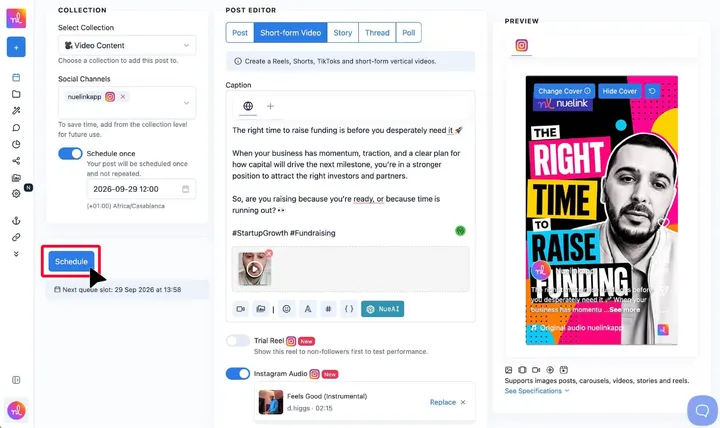
With Nuelink, you can now search for and select music for your Instagram Reels directly from the Post Editor. This allows you to prepare the video, caption, cover, music, and publishing time in one workflow.
Let’s look at how the feature works, how to use it, and the Meta API limitations you should know about.
What Is Instagram Reels Music on Nuelink?
Instagram Reels Music allows you to search for available audio and attach it to an Instagram Reel while preparing the post in Nuelink.
The option becomes available when:
- Instagram is selected as the social channel.
- Short-form Video is selected as the post type.
You can then search the available music library, choose an audio track, and schedule the Reel without needing to finish the post manually inside Instagram.
The feature is designed specifically for Instagram Reels. It is not available for regular image posts, carousels, Stories, or other post types.
Why Add Music to Instagram Reels?
Music is more than background noise. It helps establish the tone of a Reel and can make the content feel more polished and intentional.
Make Reels More Engaging
A fitting track can capture attention during the first few seconds and encourage viewers to continue watching.
Set the Right Mood
Music helps viewers immediately understand the tone of your content, whether it is energetic, educational, inspirational, humorous, or relaxed.
Keep Your Workflow in One Place
You can prepare the video, write the caption, choose the cover, select music, and schedule the Reel without moving between Nuelink and Instagram.
Plan Campaigns in Advance
Instead of waiting until publishing time to finish each Reel, you can prepare music-based content as part of your regular content calendar.
How to Add Music to an Instagram Reel with Nuelink
Here is how to search for music, add it to a Reel, and schedule the post from Nuelink.
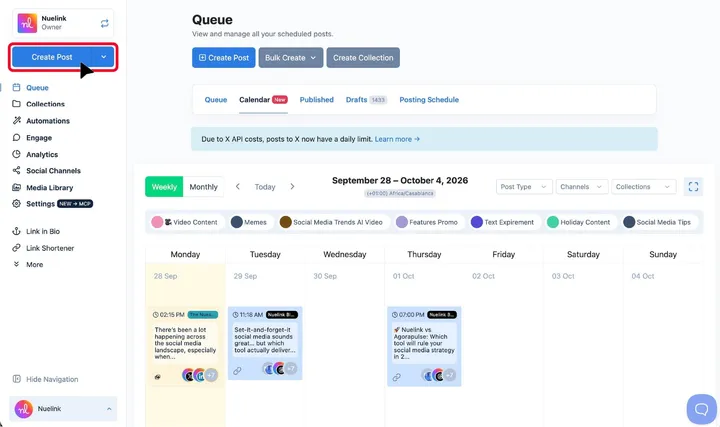
1. Open the Post Editor
Log in to your Nuelink account and click Create Post.
You can find the Create Post button in the main navigation, your Queue, or one of your Collections.
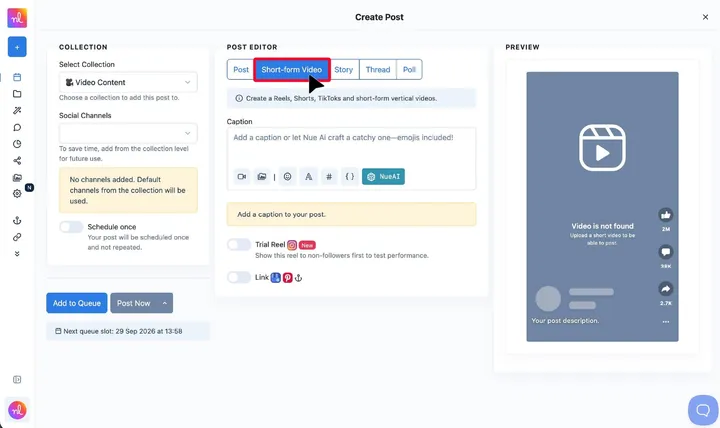
2. Select Short-form Video
From the available post types, choose Short-form Video or Shorts, Reels, TikToks.
The music option is only available for short-form videos published as Instagram Reels.
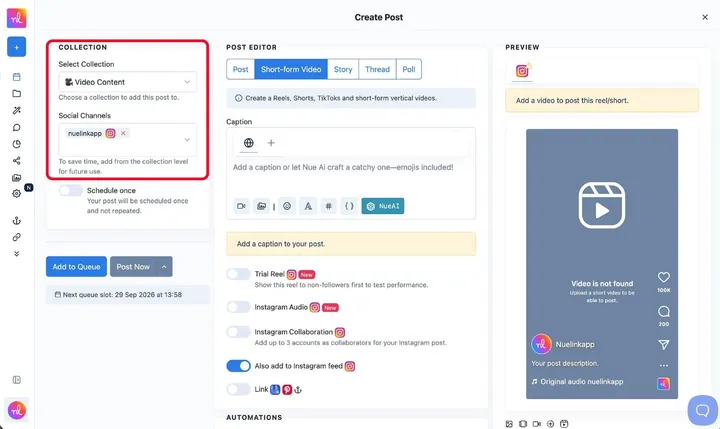
3. Select Your Collection and Instagram Account
Choose the Collection where you want to organize the post, then select the Instagram account on which the Reel will be published.
If your Instagram account is already included in the Collection, Nuelink may select it automatically.
Important: The music option will not appear unless an Instagram account and the Short-form Video post type are selected.
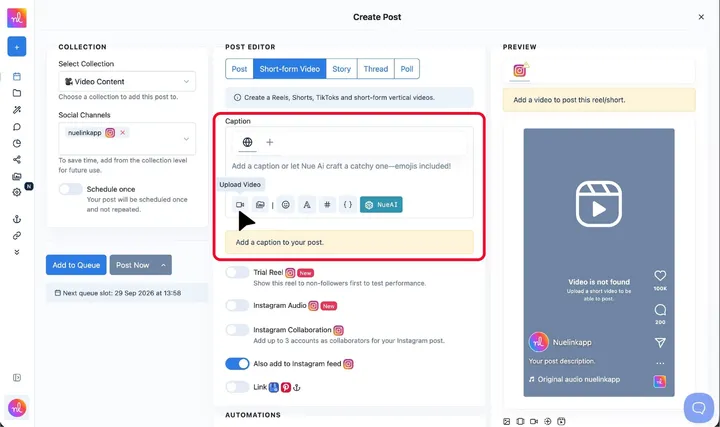
4. Upload Your Reel
Click Upload Video to add a video from your device, or choose a video from your Media Library or a supported cloud-storage service.
Check the Instagram preview and make sure the video meets Instagram’s Reel requirements.
5. Prepare the Rest of the Reel
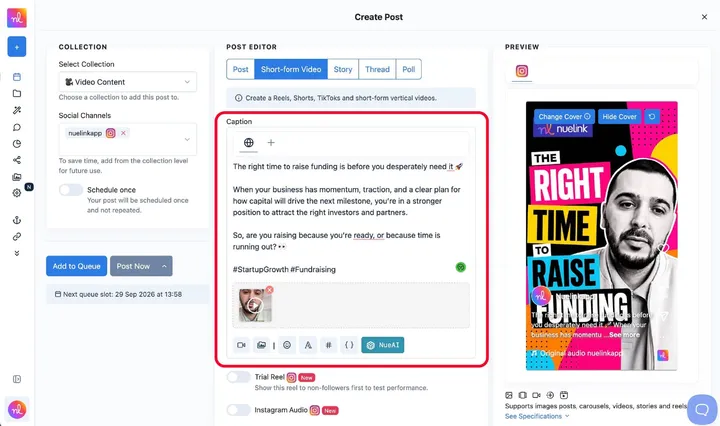
Add your caption and hashtags, choose a cover, and configure any other Instagram Reel settings you need.
You can also use NueAI to generate, improve, shorten, or expand your caption.
6. Open the Music Option
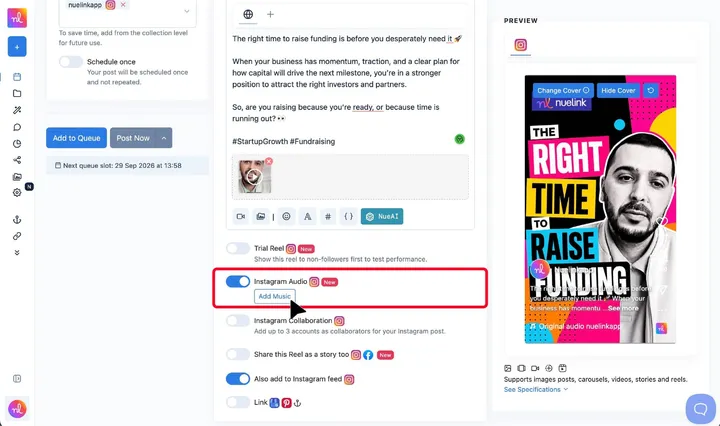
Find the Instagram Reels music option in the Post Editor.
From there, search the audio library for the music or sound you want to use.
7. Choose an Available Track
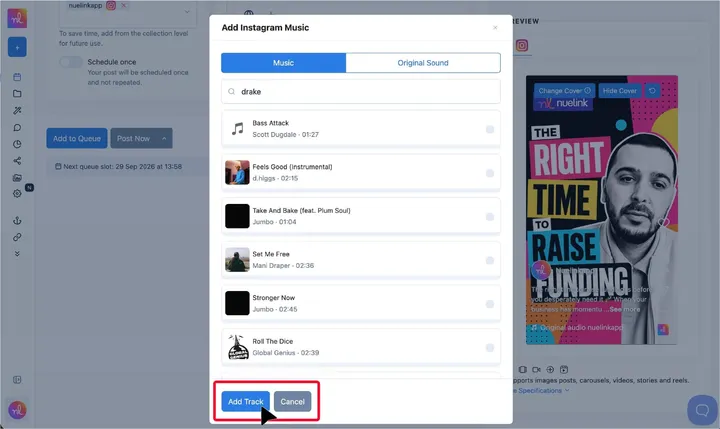
Review the search results and select the audio you want to attach to the Reel.
The results are provided through Meta’s API and may include two types of audio:
- Music
- Original sound
The available selection can differ from the music shown inside the native Instagram app.
8. Schedule or Publish Your Reel
Once the Reel is ready, choose how you want to publish it:
- Add it to your Collection’s queue.
- Schedule it for a specific date and time.
- Publish it immediately.
- Save it as a draft if you want to review it later.
Nuelink will take care of publishing the Reel with your selected settings.
Instagram Reels Music Limitations You Should Know
Music availability is controlled by Meta, so there are a few important limitations.
The Complete Instagram Music Library May Not Be Available
Meta’s API only returns audio authorized for use by third-party publishing tools.
As a result, a track available in the Instagram app may not appear when you search from Nuelink. This does not necessarily mean the feature is not working. It may simply mean that Meta has not made that track available through its API.
The Feature Works Only with Instagram Reels
Music selection is available when Instagram and Short-form Video are selected. It cannot be applied to regular Instagram images, carousels, Stories, or other post types.
Music Availability Varies by Region
The audio returned by Meta depends on the region associated with the connected Instagram account.
Two Instagram accounts in different regions may therefore see different tracks, even when searching for the same music.
Results Can Include Music and Original Sounds
Meta divides available audio into two categories: music and original sound. The selection returned for a particular search may contain one or both types.
Best Practices for Using Music in Instagram Reels
Choose Music That Supports the Content
The track should complement the message rather than distract from it. For educational or spoken Reels, choose audio that does not compete with the voice-over.
Start with the Purpose of the Reel
Consider what you want viewers to feel or do. A product announcement may benefit from energetic music, while a tutorial may work better with something subtle.
Check Availability for the Publishing Account
Music availability is connected to the Instagram account’s region. If you manage accounts for different brands or clients, do not assume every account will have access to the same tracks.
Prepare Alternatives
If a specific track is unavailable through Meta’s API, search for another version, an original sound, or music with a similar mood.
Review the Completed Reel
Before scheduling, check the video, caption, cover, selected music, Instagram account, and publishing time together.
Common Questions About Instagram Reels Music
Can I add music to Instagram Reels from Nuelink?
Yes. Select Instagram as the social channel and Short-form Video as the post type. You can then search for and select available audio from the Post Editor.
Can I schedule an Instagram Reel with music?
Yes. After selecting the audio, you can schedule the Reel for a specific date and time or add it to a Collection’s queue.
Why Can’t I Find a Song That Is Available in the Instagram App?
Meta only provides third-party tools with audio authorized for use through its API. The selection available in Nuelink can therefore differ from Instagram’s native music library.
Is Instagram Reels Music Available for Image Posts or Carousels?
No. The feature is currently available only for Instagram Reels created using the Short-form Video post type.
Does Every Instagram Account See the Same Music?
No. Available music depends partly on the region associated with the Instagram account, so different accounts may receive different results.
What Types of Audio Can Appear?
Meta can return both music and original sounds.
Can I Use the Feature for Facebook Reels, TikTok, or YouTube Shorts?
This particular music-selection feature is for Instagram Reels. Music options and API restrictions differ across platforms.
Do I Still Need to Open Instagram Before the Reel Is Published?
No. Once the Reel and its settings are ready, you can schedule or publish it through Nuelink.
Schedule Instagram Reels with Music from One Place
Adding music should not mean giving up the convenience of scheduling your content in advance.
With Nuelink, you can upload your Reel, prepare the caption and cover, search for available music, and choose when the post should go live, all from one Post Editor.
Connect your Instagram account and start preparing your next Reel with Nuelink.